Earlier this week, I had a conversation about Sentinel MCP where I gave a quick gut reaction. I said Sentinel MCP, or more broadly this type of model, might be on its way out. The thinking felt reasonable at the time. With how easy it is to vibe code API integrations now, why introduce another abstraction layer just to simplify API calls?
That assumption didn’t hold up.
As I started digging into Sentinel MCP, it became clear that this is not just about simplifying APIs. It changes how we interact with them. It shifts us away from rigid, step-by-step logic into something more dynamic. That realization is what made me completely rethink my initial reaction.
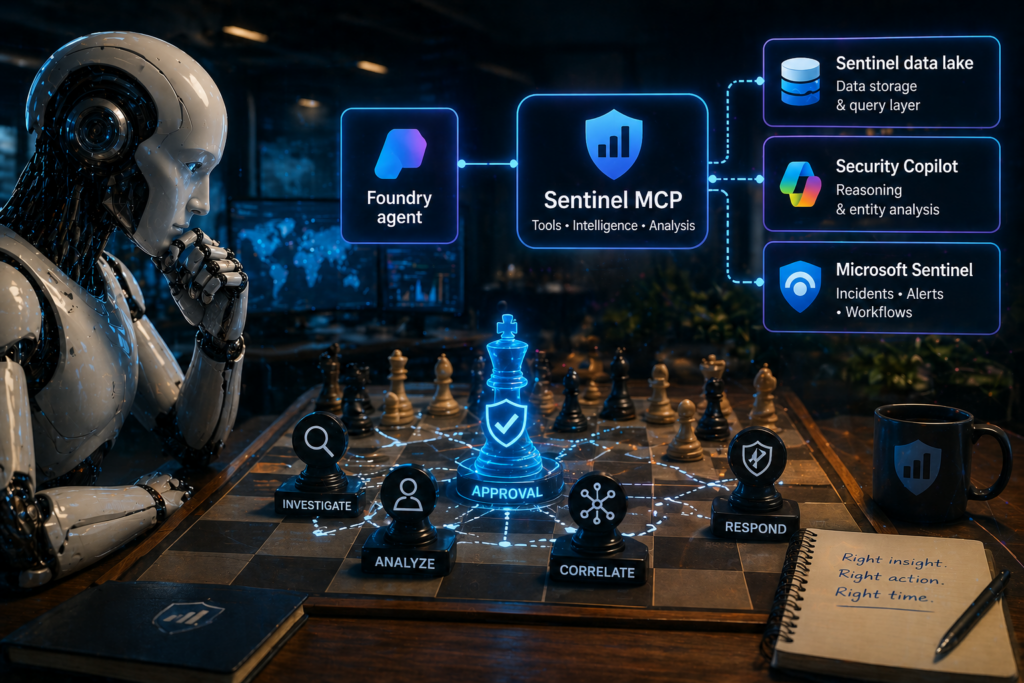
What Sentinel MCP Actually Is
When we work with APIs, the pattern is simple. You send a request, you get a response. It’s predictable and works well in deterministic workflows.
Sentinel MCP works differently.
Instead of calling a specific API, you define a collection of tools. Each tool has a name, a purpose, and a description. You don’t directly invoke those tools. You give that entire set to an agent.
From there, the interaction changes.
A request comes in, maybe something like investigating a user or summarizing an incident. The agent evaluates that request and decides how to solve it. Sometimes that’s a single tool. Other times its multiple tools working together. It might query data, then analyze an entity, then return a summary.
You’re no longer orchestrating each step yourself.
With APIs, you control the process. With Sentinel MCP, you define the capabilities and let the agent decide how to use them.
That’s the shift.
What Sentinel MCP Adds
Within Microsoft Sentinel, the tools exposed through Sentinel MCP are centered around investigation and response.
You can retrieve incidents, update them, run queries, and perform different types of analysis. Most of these capabilities are not entirely new. Anyone who has worked with Sentinel APIs or Log Analytics has done some version of this before.
What changes here is how everything is brought together.
Instead of stitching together multiple APIs and building your own logic around them, you now have a single service that presents those capabilities as tools. Sentinel MCP allows an agent to determine how to use them. As new tools are added over time, they become immediately available without requiring you to rework your design.
That’s where Sentinel MCP starts to feel less like an API layer and more like a platform.
What Sentinel MCP Depends On
One of the first things that becomes obvious is that Sentinel MCP does not stand on its own.
The most important dependency is Sentinel Data Lake. Without it, there really isn’t much to talk about.
If Sentinel Data Lake is not available, Sentinel MCP is effectively off the table.
The query layer in Sentinel MCP appears to run through Data Lake, and that’s what powers most of what the service does.
On top of that, there’s Microsoft Security Copilot. The moment Sentinel MCP moves beyond simple data retrieval and into reasoning, like entity analysis, Security Copilot becomes part of the equation.
And then there’s the data itself. Sentinel MCP relies on telemetry, typically coming from Microsoft Defender XDR and Entra. Those signals are what make the analysis meaningful.
So when you step back, Sentinel MCP is sitting on top of three layers:
- Sentinel Data Lake provides the data
- Security Copilot provides reasoning
- Defender and Entra provide the signals
Without all three, Sentinel MCP doesn’t deliver much value.
Tool Collections in Sentinel MCP
Before getting into specific capabilities like entity analysis, it helps to understand how Sentinel MCP organizes its tools.
Sentinel MCP currently groups its capabilities into three primary collections.
The first is data exploration. This is where Sentinel MCP connects most directly to Sentinel Data Lake. It allows you to discover tables, run KQL queries, and explore the underlying data. If you’re thinking in terms of raw access to logs and telemetry, this is where that happens.
The second is triage. This collection shifts from raw data access into investigation. Sentinel MCP exposes tools that help you work with incidents, alerts, devices, users, and related context. Instead of building queries yourself, you’re interacting with higher-level investigation workflows.
The third is agent creation, which is a bit unexpected at first. Sentinel MCP includes tools that can help define and deploy Security Copilot agents. It doesn’t run those agents, but it participates in building them. That moves Sentinel MCP slightly beyond data access into orchestration.
There’s also an important extension to this model.
You can take something like an advanced hunting query, define it, name it, and expose it as a tool. Once that’s done, Sentinel MCP treats it like any other capability, and an agent can discover and use it naturally.
Sentinel MCP is not limited to built-in tools. You can extend the toolset to match your own environment.
Entity Analysis
This is where Sentinel MCP starts to feel genuinely different.
Entity analysis allows Sentinel MCP to take something like a user or a URL and build a narrative around it. It evaluates activity, behavior, and patterns, then produces a summary and a verdict.
At that point, Sentinel MCP is no longer just retrieving data. It’s interpreting it.
There are clear limits today. Sentinel MCP allows up to 200 analyses per hour and 500 per day. That tells you immediately how this capability is intended to be used.
Sentinel MCP is built for focused investigation, not large-scale processing.
There’s also a limitation in scope. Today, Sentinel MCP supports only two entity types: users and URLs.
The absence of IP analysis stands out right away. The same goes for devices. These are some of the most common pivots in real investigations, and their absence is noticeable.
This feels less like a long-term limitation and more like an early-stage boundary. It’s reasonable to expect Sentinel MCP to expand both its coverage and its capacity over time.
How Sentinel MCP Is Structured and Accessed
One thing that’s easy to miss is that Sentinel MCP is not something you deploy.
Once Sentinel Data Lake is enabled, Sentinel MCP is simply available. It exists as a Microsoft-managed, persistent endpoint. You don’t provision it, configure it, or scale it.
Sentinel MCP does operate as a public endpoint, but that doesn’t mean it’s open.
Access is controlled through identity. You authenticate using Entra ID, and your permissions determine what you can do. There is no option to place Sentinel MCP behind a private endpoint or restrict it at the network layer.
With Sentinel MCP, identity is the control plane, not network isolation.
If necessary, the service can be disabled through a support request, but otherwise it is always present when the prerequisites are met.
How You Interact With Sentinel MCP
There are several ways to work with Sentinel MCP, and each one shapes the experience differently.
Security Copilot
Microsoft Security Copilot integrates with Sentinel MCP in two primary ways.
The first is through the Sentinel Graph MCP plugin. When enabled, Security Copilot dynamically discovers and uses Sentinel MCP tools as part of its normal interaction. You ask a question, and Security Copilot determines how to use those tools behind the scenes.
The second is through custom Security Copilot agents. In this model, you explicitly attach Sentinel MCP as a tool. This gives you more control over how the tools are used, although everything still runs within the Security Copilot environment.
It’s also important to understand that Security Copilot is not just a front end. It is used behind the scenes when Sentinel MCP performs reasoning, such as during entity analysis.
Azure AI Foundry
Azure AI Foundry provides a more flexible and controlled approach to working with Sentinel MCP.
You can host your own model, build your own agent, and connect that agent to Sentinel MCP.
This gives you control over how the agent behaves, how it reasons, and how it is exposed. You can also make that agent available through an API, which makes it much easier to integrate with other systems.
Using Azure AI Foundry with Sentinel MCP is often the most practical way to build structured, repeatable solutions.
Visual Studio Code
Visual Studio Code is the simplest way to start experimenting with Sentinel MCP.
You connect, authenticate, and interact through a chat interface. It’s designed for exploration and learning rather than production use, but it’s extremely useful for understanding how Sentinel MCP behaves.
Logic Apps and Functions
There is no direct connector that allows Logic Apps or Functions to call Sentinel MCP as a general-purpose service.
Some Sentinel MCP capabilities, like user and URL analysis, are exposed as actions within the Sentinel connector. These use the same underlying functionality but present it in a structured way.
In practice, the better pattern is to introduce an agent.
Logic App or Function → Foundry agent → Sentinel MCP
This allows the agent to handle reasoning and tool selection rather than forcing Sentinel MCP into a deterministic workflow.
ChatGPT and Claude
There is a documented way to connect Sentinel MCP to ChatGPT and Claude using Entra app registration and delegated permissions.
At a minimum, this requires a supported subscription tier:
- ChatGPT Pro or Enterprise
- Claude Pro, Max, Team, or Enterprise
In enterprise scenarios, an administrator can deploy a connector across the organization rather than relying on individual user configuration.
While Pro-tier access can be useful for testing, it does not provide the same level of privacy, data handling guarantees, or administrative control as an enterprise agreement.
Connecting a production Sentinel environment to a personal or Pro-tier LLM account is not recommended.
Enterprise deployments introduce governance, centralized control, and contractual protections that are important when working with sensitive security data.
Cost Considerations
Before getting into lab setup, it’s worth briefly outlining how cost works with Sentinel MCP.
The service itself does not have a direct charge. Instead, cost is tied to the underlying services it uses.
When Sentinel MCP queries data, it operates through Sentinel data lake, and those queries contribute to data scan costs. When it performs reasoning, such as entity analysis, it relies on Microsoft Security Copilot, which introduces compute consumption through that service.
Sentinel MCP does not have its own cost model, it inherits cost from the services it uses.
In practice, usage will vary depending on how often queries are executed and how frequently reasoning-based tools are used.
Building a Lab
Setting up a lab for Sentinel MCP requires a realistic environment.
At a minimum, you need Sentinel with Data Lake enabled, Defender XDR or Defender for Endpoint, Entra logs, and access to Security Copilot. You also need activity. Without telemetry, Sentinel MCP has nothing to analyze.
A few VMs and onboarded endpoints are enough to get started, but the environment needs to generate meaningful data.
For interaction, Visual Studio Code is the easiest place to begin. For more structured scenarios, Azure AI Foundry is the better option.
Closing Thoughts
I started this thinking Sentinel MCP might not be necessary.
I don’t think that anymore.
But I also don’t think Sentinel MCP is complete.
Right now, Sentinel MCP is tightly coupled to Sentinel Data Lake and Security Copilot, and that creates limitations. There are environments where those services are not available, not desired, or not cost-effective. Those customers shouldn’t be excluded from this type of capability.
There’s also clear room to expand.
Entity analysis should evolve to include IPs and devices. That feels like a natural next step. Beyond that, the real opportunity is not just better analysis, but action.
It’s not difficult to imagine Sentinel MCP evolving to support:
- disabling user accounts
- forcing MFA resets
- revoking sessions
- isolating devices
- triggering antivirus scans
- executing live response actions
At that point, Sentinel MCP becomes more than an investigation tool. It becomes an operational layer.
That shift would require control. It would likely introduce different modes of operation, ranging from observation to full automation. It would also require strong logging and auditability, capturing not just what actions were taken, but why they were taken and who approved them.
That’s something I plan to build on next.
In a follow-up article, I’m going to take a more practical approach and look at how to fully leverage Sentinel MCP, but also how to achieve similar outcomes using both deterministic workflows and agent-based approaches for environments where Sentinel MCP is not an option.
That means exploring how traditional Logic Apps compare to agent-driven designs using Azure AI Foundry, and how both approaches can be used to solve the same problem in different ways.
The goal isn’t to pick a single approach. It’s to make sure we have viable solutions regardless of platform constraints.
Because in reality, not every environment will have access to Sentinel Data Lake or Security Copilot, and those environments still need effective, modern security workflows.
Instead of telling the system exactly what to do, Sentinel MCP allows you to define what it can do and let it figure out how.
That’s the shift.
And it feels like we’re just getting started.
Previously, I demonstrated a deterministic approach to AI Operated SOC using Foundry AI. We also discussed Deterministic vs. Agentic Logic and soon AI Operated Agentic SOC.