One topic that’s been coming up frequently with customers is the adoption of Defender unified role-based access control (RBAC) and the approaching December 2026 rollout target.

Microsoft’s security products matured independently, and so did their permissions. Defender for Endpoint, Defender for Identity, Defender for Office 365, and Defender for Cloud Apps each brought their own approach to administration. Sentinel and Defender for Cloud naturally adopted Azure RBAC because they were built around Azure resources.
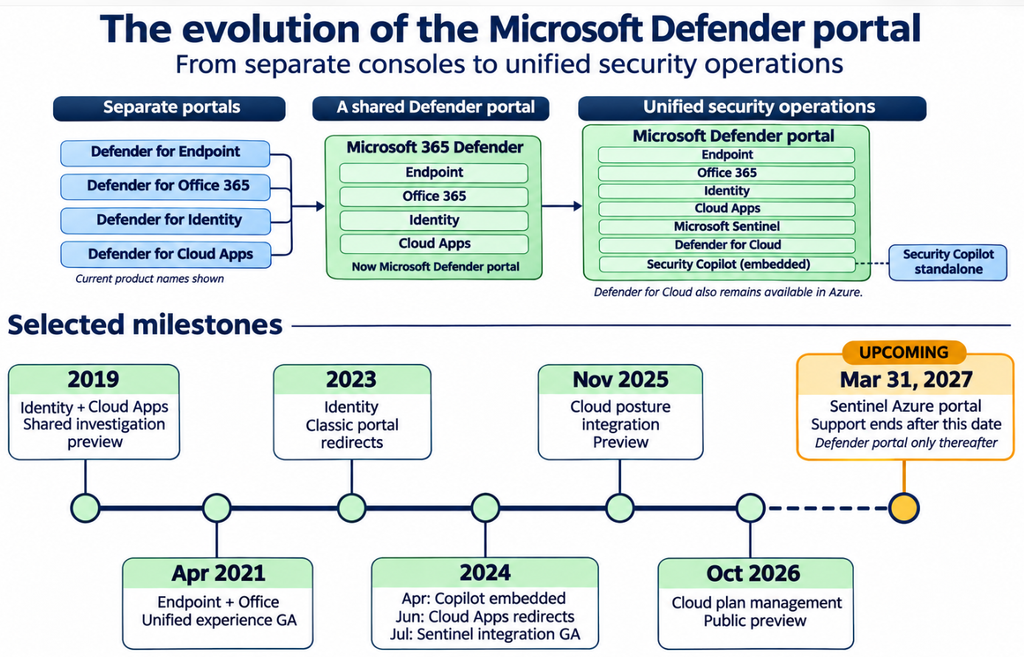
As these products come together in the Defender portal, unified RBAC brings their permission management together too. Beyond simplifying access administration across security tools, it provides the permission model required by new security experiences, including Microsoft Perception. Moving to unified RBAC prepares your organization for those capabilities.
Two permission systems, one identity
Microsoft Entra holds your identities and manages authentication, including Conditional Access and multifactor authentication. Entra directory roles, such as Security Administrator, grant access to identity services and supported Microsoft 365 security experiences.
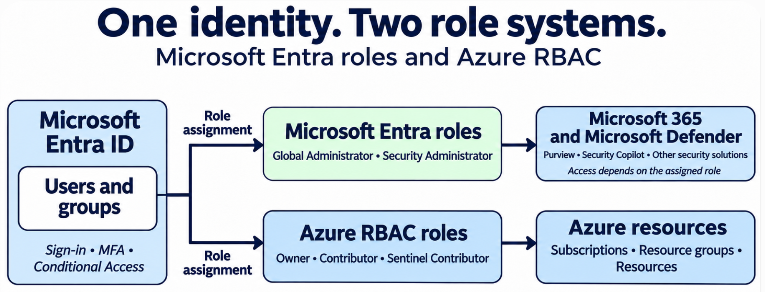
Azure RBAC separately controls access to Azure resources through roles such as Owner, Contributor, and Microsoft Sentinel Contributor. Your Entra account can receive assignments in either system. Having an Entra administrator role does not automatically make you an Azure subscription administrator.
This reminds me of domain permissions versus local server permissions: the same account can participate in both, but each controls a different administrative boundary.
What unified RBAC brings together
Unified RBAC lets you create permission sets and assign them to Entra users or groups across supported security services. One role can span endpoint investigation, identity security, and Sentinel incident response, with the appropriate scopes.
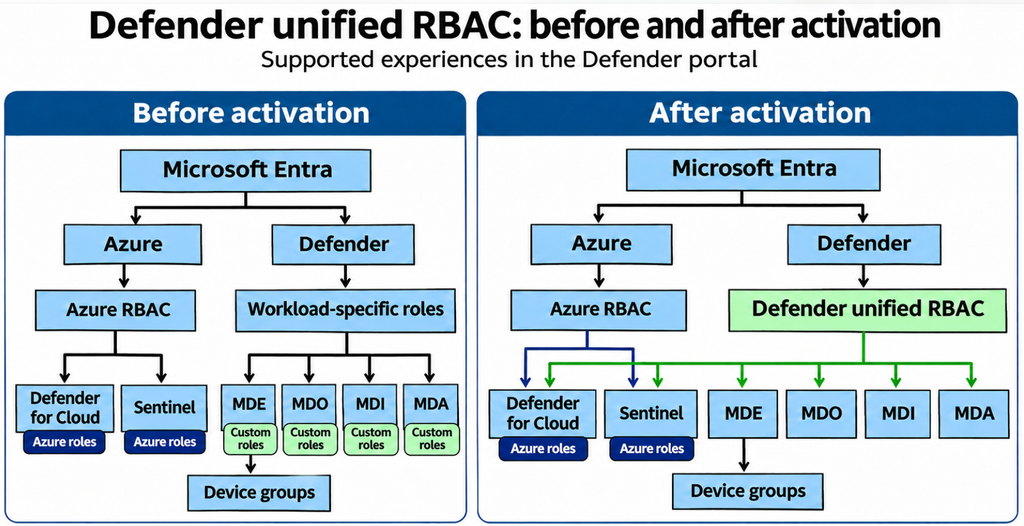
Microsoft calls these services workloads. Activating a workload means switching that service to unified RBAC for its supported Defender portal experiences. Endpoint, Identity, and Office 365 are familiar examples. Sentinel is activated separately for each workspace.
Entra, Purview, and Intune still retain their separate administrative permission models.
Import, review, activate
The manual migration has two main steps:
- Import your existing roles. This creates unified RBAC copies of eligible legacy roles, mapping their permissions and preserving their user and group assignments. You can import individually or in batches.
- Activate the workload. This starts enforcing the new roles. The original legacy roles stop granting access for that workload, and you manage future role changes in unified RBAC.
Importing alone does not change anyone’s active access. You can review the copies before activation, then validate effective access after switching over.
For organizations using Defender for Endpoint device groups to separate departments or administrative teams, those device groups are retained. Their membership rules, precedence, and device-scoping function remain in place. You are changing the role model, not rebuilding your departmental device segmentation.
You can roll back
The original roles remain available. Before activation, you can delete an imported copy and reimport it without changing the source role.
After activation, supported existing workloads can be switched back to their previous permission model by turning off workload activation. Deleting an imported role alone does not perform that rollback; deactivate the workload first. Changes made to unified RBAC roles do not synchronize back to the legacy copies.
These controls are under System > Permissions > Microsoft Defender XDR > Roles > Workload settings. Microsoft documents the steps in its activation and rollback guide.
Azure roles continue to work
Unified RBAC does not remove your existing Azure RBAC access. It adds the ability to grant access to supported Sentinel and Defender for Cloud experiences from within Defender.
For Sentinel, unified RBAC assignments synchronize to Azure RBAC. Once a workspace is activated, manage those supported permissions in Defender; editing them directly in Azure can cause synchronization errors. Azure RBAC continues to govern other Azure resources.
You can also let Microsoft handle the transition
Microsoft’s announced automatic rollout targets affected tenants through December 2026. It automatically imports applicable roles and provides approximately 30 days between the in-portal notification and activation.
Look for MC1457836 in the Microsoft 365 Message Center for the details affecting your organization.
Plan the change, without overcomplicating it
My view is that this migration can attract more anxiety than it warrants, especially in organizations with extensive custom roles and departmental scoping. Complexity deserves a planned change and representative access checks, but it does not automatically make this a high-risk or lengthy project.
The process preserves existing role assignments through import, retains endpoint device groups, and provides a rollback path. Microsoft is also using an automated version of this transition at scale.
For many organizations, this can be a short, controlled change: import, review, activate, and validate. Spend the time confirming your administrators have the access they need, then move forward with confidence.