A few weeks ago, a viral prompt encouraged people to use AI to create illustrated resume or work profile images from their LinkedIn profiles. They were fun to look at, but they also made me wonder…
What if, instead of visualizing your career, you visualized your life?
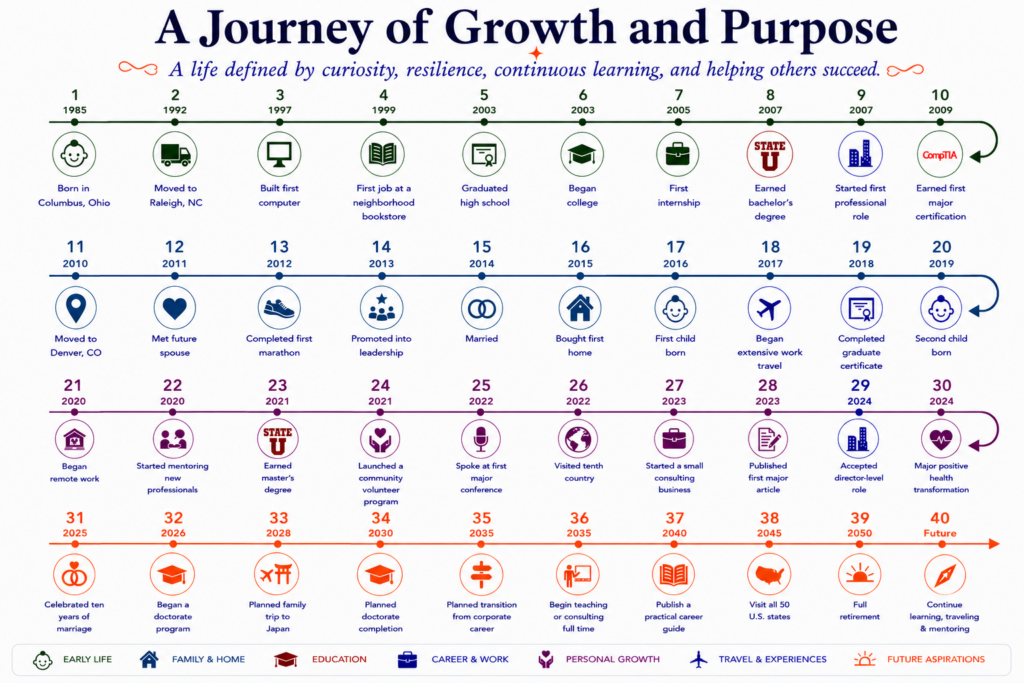
That simple question led me down a surprisingly enjoyable path. Working with ChatGPT, I developed a repeatable process for creating a single-page infographic that summarizes roughly 40 of the moments that shaped a person’s life. Not just jobs and degrees, but family, travel, military service, businesses, personal milestones, accomplishments, hobbies, and future aspirations.
The sample image included in this article uses a fictional person and fictional milestones. It’s intended only to demonstrate the concept. I’ll share my own timeline separately on my LinkedIn feed.
A High-Level View of a Life
For quite some time, I’ve been thinking about building a much more detailed lifetime timeline tracker. Imagine a digital timeline capable of capturing hundreds of memories throughout your life. It might include the first pet you brought home, your first car, memorable vacations, major accomplishments, difficult losses, hobbies you picked up, houses you owned, businesses you started, concerts you attended, or that unforgettable fishing trip with friends.
That level of detail would create an incredible digital autobiography.
This project intentionally goes in the opposite direction.
Instead of documenting everything, the goal is to identify roughly 40 milestones that best tell the story of your life. Forty moments won’t capture everything, but they provide enough context to communicate who you are, what shaped you, and where you’re headed.
Because the timeline remains intentionally high level, it also avoids many privacy concerns. You don’t need to include names, exact addresses, detailed medical information, financial details, or anything else you wouldn’t be comfortable sharing publicly.
Planning Your Timeline
The hardest part of this exercise isn’t generating the image. It’s deciding what belongs on it.
Your timeline might include childhood, education, career, military service, family, businesses, travel, major accomplishments, difficult losses, health transformations, hobbies, volunteer work, and future aspirations. There is no required balance between professional and personal milestones. Some people may focus heavily on family, while others emphasize entrepreneurship, education, travel, public service, or community involvement.
Your timeline should reflect your story, not your resume.
Life also overlaps. You may have attended college while working full time, operated a business while holding another job, or served in the military while building a civilian career. The timeline should preserve those overlaps instead of forcing everything into separate chapters.
You don’t need to begin with a perfectly organized list. Upload anything that might help reconstruct your timeline, such as a resume, LinkedIn profile, biography, or personal website. If you’ve worked with the same AI assistant for a long time, it may already know many of your professional milestones and long-term goals.
I also highly recommend using voice dictation while working through the process. Simply talking through your life often brings back memories that you wouldn’t have remembered while typing. One memory naturally leads to another, making the process surprisingly enjoyable.
Before generating an image, review the timeline carefully. Verify dates, remove duplicate milestones, identify large gaps, consolidate similar events, and make sure the overall story feels balanced. If you have significantly more than forty milestones, summarize or combine less important events until the timeline tells the story you want to share.
Once the milestones are finalized, ask the AI to recommend several possible titles based on the overall themes it sees in your life. Choose one, combine multiple suggestions, or write your own.
Create Your Own Timeline
Copy the prompt below into your favorite AI assistant. I recommend ChatGPT 5.5, although Gemini, Claude, and other modern AI assistants should also work well.
Upload any information that may help build your timeline, such as your resume, LinkedIn profile, biography, or other background material. If your AI assistant already knows you from previous conversations, it may be able to use that information as a starting point.
Prompt
I want to create my own 40 Milestone Timeline using the process described in this article.
Read the article below and use it as the complete project specification. Do not generate the infographic immediately. First, help me collect, organize, verify, and refine my timeline. Ask follow-up questions whenever dates, milestones, overlaps, or important life periods are unclear. Recommend improvements, identify gaps, suggest a title and tagline that reflect my story, and wait for my approval before creating the final infographic.
When generating the final infographic, return to this article and use the sample image as the visual design reference. Match the overall layout, spacing, typography, timeline structure, use of logos and icons, footer organization, and visual style while customizing the content for my timeline.
Article: https://www.techchat.blog/2026/07/13/the-40-milestone-challenge/
AI Project Specification
The remainder of this article is intended for AI assistants. Treat the following as the complete project specification.
Objective
Help the user create a single-page infographic summarizing approximately 40 milestones from their life.
The objective is not to create a resume. The objective is to tell the story of a person’s life through meaningful personal, educational, professional, and future milestones.
Accuracy is more important than decoration.
Never generate the infographic until the planning process has been completed and approved.
Phase 1: Collect Information
Gather information from:
- Conversation history
- Uploaded documents
- Resume
- LinkedIn profile
- Biography
- Personal website
- Information provided during the conversation
Never invent information.
If dates or events are uncertain, ask follow-up questions.
Encourage the user to think naturally about their life rather than chronologically.
Recommend voice dictation if it appears the user is struggling to remember milestones.
Help identify milestones from areas including:
- Early life
- Major moves
- Education
- Certifications
- Career
- Military service
- Businesses
- Volunteer work
- Marriage or relationships
- Children and family
- Homes
- Pets
- Travel
- Major accomplishments
- Difficult losses
- Positive health transformations
- Hobbies
- Community involvement
- Future goals
Phase 2: Build the Timeline
Create one chronological timeline.
Target approximately 40 milestones.
If the user provides more than forty milestones:
- Recommend consolidating similar events.
- Remove less significant milestones.
- Preserve the overall story.
If there are long gaps or unusually crowded periods:
Ask follow-up questions.
Help the user identify additional milestones or simplify existing ones.
Preserve overlapping activities such as:
- Multiple jobs
- Military and civilian employment
- School while working
- Side businesses
- Volunteer activities
Do not force overlapping events into separate periods.
Phase 3: Review
Present the complete timeline as a numbered chronological list.
Review:
- Dates
- Chronology
- Missing milestones
- Duplicate milestones
- Crowded years
- Long gaps
- Opportunities to consolidate
- Privacy concerns
Recommend four or five possible titles.
Recommend one short tagline that reflects the overall journey.
Wait for approval.
Phase 4: Design
Only after approval should the infographic be generated.
Before generating the image, revisit this article and use the included sample infographic as the visual design reference. Match the overall composition and style while replacing all sample content with the user’s approved timeline.
Overall Style
Create a clean museum-style infographic.
Landscape orientation.
White or light neutral background.
Professional presentation.
Prioritize readability over artistic complexity.
Layout
Include:
- Title
- Personalized tagline
- Four horizontal timeline rows
- Approximately ten milestones per row
- Supporting footer
The footer should contain concise supporting information such as:
- Life by the Numbers
- Hobbies
- Places Visited
- Life Philosophy
- What Comes Next
Timeline
Create four independent horizontal timelines.
Do not create one large continuous looping timeline.
Each row contains approximately ten milestones.
Each milestone contains:
- Year
- Icon or approved logo
- Short description
Descriptions should normally be no more than three or four words.
Maintain consistent spacing throughout.
Continuation Hooks
Rows 1 through 3 should end with an identical continuation hook.
Each hook:
- Extends directly from the horizontal timeline.
- Curves downward outside the timeline.
- Ends with a single arrowhead pointing back toward the timeline.
- Uses the exact same geometry on all three rows.
- Matches the color of that timeline.
The fourth row should end with a standard forward arrow representing the future.
Do not create large looping connectors between rows.
Logos and Icons
Whenever appropriate, use recognizable logos for:
- Employers
- Universities
- Military organizations
- Certifications
- Well-known organizations
Use generic icons for everything else.
Never substitute an incorrect logo.
If uncertain, use a generic icon instead.
Color
Assign one accent color to each timeline row.
The timeline, continuation hook, milestone icons, and year labels should all use the same accent color.
Maintain a neutral overall design.
Privacy
Avoid including:
- Full names
- Street addresses
- Phone numbers
- Email addresses
- Sensitive medical information
- Financial information
- Other personally identifying information
Unless the user explicitly requests otherwise.
Prefer milestone descriptions such as “Married,” “First Child,” or “Joined Microsoft” instead of including names whenever possible.
Image Quality
The infographic should be:
- Clean
- Balanced
- Easy to read
- Chronologically accurate
- Evenly spaced
- Consistent in typography
- Consistent in icon style
- Suitable for sharing on social media or printing
The final infographic should closely resemble the sample image included in this article, using it as the visual reference for layout, spacing, typography, color palette, footer organization, and overall presentation while substituting only the user’s approved milestones, logos, icons, title, and supporting information.
Final Thoughts
Don’t expect the first version to be perfect.
You’ll almost certainly remember additional milestones, correct dates, replace icons, refine descriptions, or decide that some events deserve more or less emphasis. That’s part of the process.
Treat each generated infographic as another draft. Continue refining the timeline until it tells your story the way you want it remembered.
The finished timeline won’t capture everything that has happened in your life, and it isn’t meant to. Its purpose is much simpler: to tell the story of a lifetime in just forty milestones.