I recently shared an article about Agent 365, and one of the core topics worth understanding is the relationship between agent blueprints, agent identities, and agent users.

On the surface, this can seem complicated. I could easily see these terms tripping people up on a future certification exam. It’s also one of those topics you can dance around for quite a while without really learning how it works, to your disadvantage.
But once you understand the relationships, the pieces start to make sense. A few minutes spent here could make future conversations easier, help with a certification exam, or give you a better answer to a difficult interview question.
At the end of the day, an agent is part of an application. It receives a request, performs some work, and returns a result. Along the way, it needs permission to access whatever that work requires. When interacting with services protected by Microsoft Entra, that generally involves obtaining an access token.
The relationship between the blueprint, agent ID, and agent user determines how the application obtains that token and whose identity it represents. That’s the process we’ll walk through here.
First, who is doing the work?
When we interact with a cloud-hosted agent, we generally authenticate to the application or platform hosting it. We use that application to send requests and retrieve responses from an AI service. That could be someone typing into a chat window, but it could just as easily be another application or an automated process.
Rather than interacting directly with a model, the agent gives us a framework for working with it. The agent has goals, tools, and guardrails. It may even call other agents to complete a task. As applications adopt these patterns, a single AI request can involve several tool calls or agents before we get a response.
Along the way, the agent needs access to the model and usually to other services. If it’s going to book a flight, it needs access to the booking service’s API. If it’s going to send an email, it needs access to a mailbox. If it’s going to unlock a door, it needs to call the service that controls the lock. Those calls almost always require some form of authentication.
The design of the application or agent determines which identity it uses for each operation. For example:
- If it’s sending an email on my behalf, it uses authorization associated with my user identity.
- If it’s calling an MCP server using its own Entra agent identity, it uses that agent ID.
- If it’s sending an email from its own mailbox, it uses an agent user account.
One application could use all three. What we perceive as a single request could produce multiple model requests, API calls, and tool interactions. The application needs to use the right identity and authorization for each operation.
Why give the agent its own identity?
Many agent platforms perform work on behalf of the user. This has an inherent advantage: within that delegated access, the agent can’t do anything the user isn’t already allowed to do. We can further constrain it to a small subset of the user’s permissions.
But what happens when we need the agent to do something the user isn’t authorized to do? Or when there’s no user involved at all?
A backend process might need to respond to an uploaded file, run on a schedule, or react to an event. This is where the agent needs its own authorized access.
Don’t let the word autonomous get you too worked up. In this context, it could simply mean that nobody needs to be signed in when the work happens. Someone rang the doorbell. Someone uploaded a file. A scheduled task started. The application responds to that trigger and performs its work.
Giving the agent an ID gives us an identity to assign permissions to and a way to identify its activity. It allows the agent to act under its own identity when needed.
When that identity comes from Entra, we can grant it appropriate access to Azure, Microsoft 365, and other services that trust Entra. It can also authenticate the requests used to send telemetry to Agent 365 when that collection is configured.
Just as useful, it gives us a place to intervene. We can restrict permissions, block authentication, or disable the identity. That limits the agent’s ability to interact with services through that identity.
Of course, the agent might have other connections. If it holds an API key for an unrelated service, disabling its Entra identity won’t disable that tool. Still, Agent ID can be a very effective point of control.
Applications already have ways to authenticate through app registrations, certificates, secrets, and managed identities. Agent ID builds on that foundation with an identity model intended for agents. When I’m designing an agent that interacts with Azure or Microsoft 365, that’s the approach I want to consider first.
Think of it as a digital wallet
Before getting into the individual components, imagine a digital wallet.
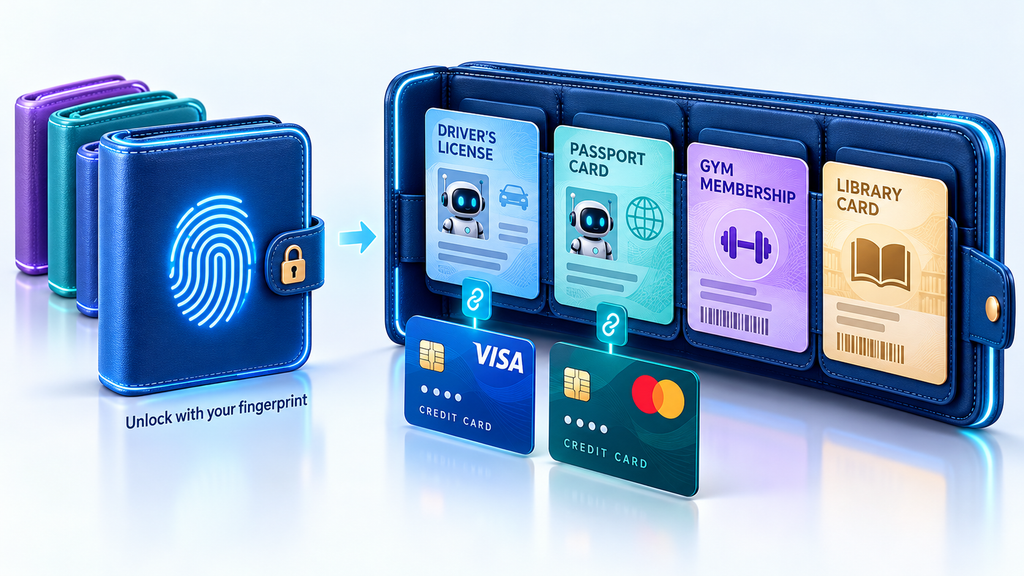
Because you’re an international person of mystery, you have several of them. Different colors, different purposes, perhaps wallets from different countries. Each wallet holds one or more identity cards, and each identity card can have one associated credit card.
First, you unlock the wallet using your fingerprint or another trusted method. Then you select the card you need.
Your IDs identify you. One might be a driver’s license, another a passport, and another a gym membership card. Each has its own purpose and permissions. Your gym membership card can’t be used to board a plane.
You also have bank accounts associated with several of those IDs. In this example, you can use a credit card to make purchases only when you also have its associated ID. Just think about how your driver’s license and your debit card are intrinsically linked, or how you might associate a payment account with your library card so that they can charge you for late returns.
For our purposes:
- The wallet is the blueprint. You could have more than one wallet.
- The method used to unlock it represents the application’s authentication credentials.
- Each identity card represents an agent ID.
- An optional credit card associated with that identity card represents the agent user account, which provides access to a different set of capabilities.
You authenticate to the shared foundation, then obtain access, permissions, or abilities using a particular identity associated with it.
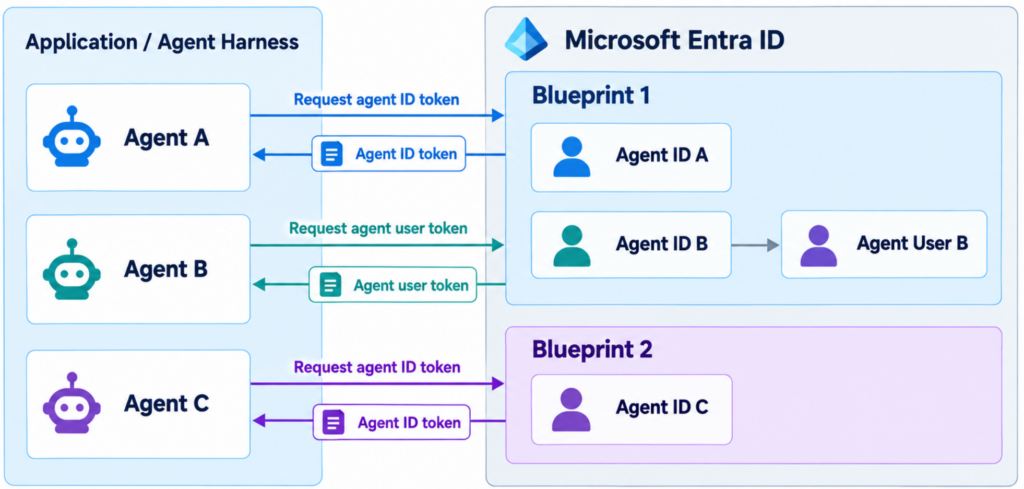
One application can also coordinate many agents through an agent harness. Each could have its own agent ID. Some could have separate blueprints, while others could share the same blueprint. Think of the application as carrying several wallets and selecting the appropriate identity for the work at hand.
Start by authenticating as the blueprint
The agent identity blueprint provides the shared authentication foundation. It has many similarities to a traditional Entra service principal or app registration.
Before the application can obtain tokens for an associated agent, it needs to authenticate as that blueprint.
There are several ways to do this. On Azure, the application can use a managed identity through federation. Other supported options include federation with a trusted external identity provider, a certificate, or a client secret.
You might think of a client secret as similar to an API key: it’s a credential the application presents to prove its identity. Secrets remain common in some scenarios, although I would favor managed identity or federation where possible.
Once authenticated, the application uses the supported token exchange process to obtain a token for an associated agent ID or its agent user account.
Entra issues the token. The blueprint establishes the authentication relationship that allows the application to obtain it.
Going back to our wallet, we’ve proven that we’re allowed to open it. Now we can obtain access using the appropriate identity inside.
One blueprint, one or more agent IDs
In practice, I often see a blueprint with a single agent ID and possibly a single agent user account. That’s an easy arrangement to understand, and it’s a reasonable starting point.
There may also be legitimate reasons to associate multiple agent IDs with the same blueprint. An application could deploy the same agent for different stores, regions, or business units, with each instance having its own identity and permissions.
An automated service might also create and retire agent identities programmatically. Consider an agent harness coordinating 100 agents. A shared blueprint gives those identities a common foundation without requiring a separate blueprint for every instance.
It also gives us a shared point of control. Disabling the blueprint prevents its associated agent identities from authenticating.
Development, test, and production agents could have separate agent IDs too. Personally, I would consider whether those environments should have separate blueprints as well. Sharing a blueprint means sharing an authentication dependency, so the decision comes down to how much separation I want.
The relationships to remember are:
- A blueprint can support multiple agent IDs.
- Each agent ID belongs to one blueprint.
- Each agent ID can have up to one associated agent user account.
- Each agent user account belongs to one agent ID.
Give the agent permission to do its job
Once we have the identity, we need to decide what it can access.
The blueprint can hold API permission grants eligible for inheritance. The agent ID can also have its own direct API permissions, supported Entra roles, and Azure role assignments.
That last distinction matters: Azure and Entra roles can’t be assigned directly to the blueprint. They need to be assigned to the agent identity.
Agent IDs may inherit some API permissions from the blueprint, but they also have their own permissions for APIs, Entra, and Azure.
Sometimes the agent needs a user presence
An agent ID is sufficient for many tasks. Some services and workflows, however, require a user identity. That’s where the optional agent user account comes in.
Several Microsoft 365 capabilities depend on having a user account. Giving an automated service an appropriate user presence can be useful. A mailbox for sending and receiving email is an easy example.
Each agent ID can have up to one associated agent user account. That account has its own identifier and can support appropriate licensing, group membership, and Microsoft 365 capabilities.
This starts to establish the future vision of an agentic coworker. We’re moving beyond an assistant that only acts for a human employee toward an agent with its own presence: its own account, its own email, and a place in collaborative workflows.
It doesn’t sign in like an ordinary employee with a password. Authentication depends on its associated agent identity. But it gives the application a way to work with services that require a user account.
Who is responsible for all of this?
Once we give agents identities and access, we need people who are responsible for them.
I distinguish those relationships this way:
- Owner: Who is authorized to maintain and configure the identity?
- Sponsor: Who is accountable for its business purpose and continued use?
- Manager: Who does the agent user report to?
Owners are optional because an appropriately authorized administrator can manage an identity without being individually listed as its owner. Administrative authority can come from a role assignment, such as Agent ID Administrator.
A sponsor must be specified when creating a blueprint or agent identity. Sponsors have limited lifecycle rights, including disabling or soft-deleting agent identities, but they don’t have the owner’s ability to manage authentication settings or restore a disabled identity.
The manager relationship is optional for an agent user. It establishes where that agent sits in the organizational hierarchy and provides another human connection for lifecycle decisions. It doesn’t automatically grant technical administration rights.
For me, the sponsor is especially useful when a decision requires business context. As an administrator, I might be authorized to disable an agent, but having permission to disable it doesn’t mean I understand the impact of doing so.
The sponsor should be someone I can ask: Is this agent still needed? Is this behavior expected? What happens if we turn it off?
Where Conditional Access comes in
We’ve now established how the application authenticates and what the agent can access. Conditional Access adds another decision: should Entra issue the token under these circumstances?
Agent identities have their own policy scope. They aren’t included in the traditional “All users” scope, and agent user accounts also need explicit agent targeting.
For agent identities, the controls are narrower than those available for humans. Agent risk, currently in preview, can be used as a condition, and the enforcement control is Block access. A practical policy might block an agent when its risk reaches a selected level.
There isn’t an interactive remediation step where we ask the agent to complete MFA.
Agent user accounts have additional options for supported endpoint scenarios, including requiring a compliant device. So risk-based blocking is the core example for agent identities, but it isn’t the only capability across every agent scenario.
Meanwhile, the human signing in to use the application still encounters the applicable user policies. Delegated access on that person’s behalf also follows the relevant user policy evaluation.
The user’s access and the agent’s access are separate decisions. We need to account for both.
What if the agent only occasionally needs access?
I wouldn’t necessarily want every permission an agent might ever need assigned permanently.
Access packages give us another option. We can group supported access, establish who can request it, require approval, and set an expiration.
Imagine that our agent occasionally needs access to a restricted project resource. The application could request an access package for its agent ID, provide a justification, and wait for approval. If approved, the assignment provides access for the configured period.
That gives us a useful way to put a human decision in front of additional access. But approving access isn’t the same as approving one specific action. During the assignment, the agent can use the permissions it received.
If I need someone to approve a particular change, I would still engineer that approval into the agent or tool workflow. The access package controls whether the agent gets the permissions; the workflow controls whether it proceeds with that action.
I wouldn’t require human approval for every routine permission. That would create overhead and approval fatigue. I would reserve it for situations where the additional oversight has a meaningful benefit.
What Agent ID gives us
Agent ID gives an agent an identity we can recognize, authorize, and manage within Entra.
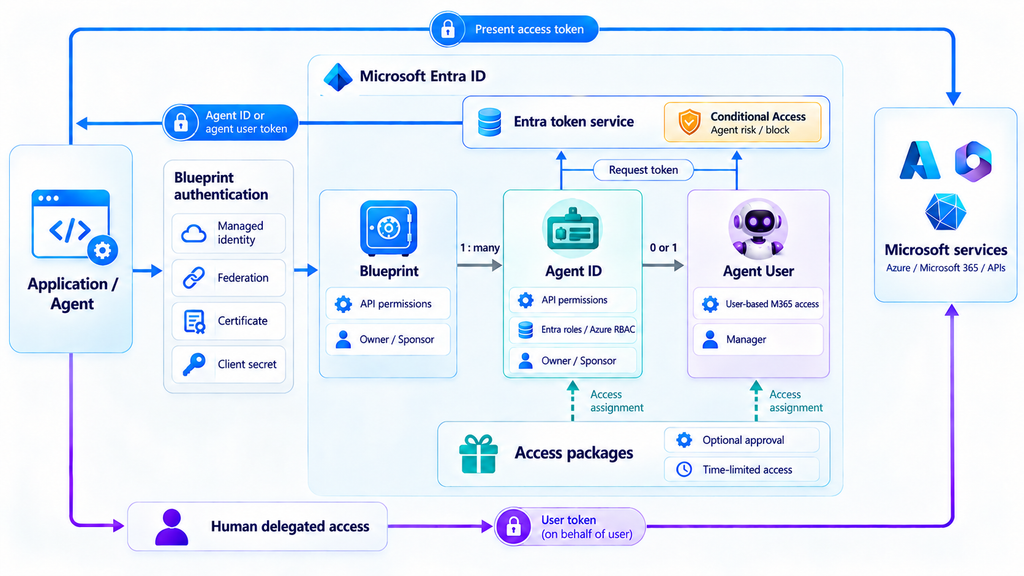
The blueprint provides the authentication foundation. The agent ID identifies the individual agent and carries its access. An optional agent user account gives it a user presence when its work requires one.
Once those relationships are clear, the other capabilities have a place: owners maintain the identities, sponsors provide business accountability, Conditional Access can block risky access, and access packages can govern additional permissions.
These distinctions also help with auditing and attribution when agents interact with Microsoft and other services that trust Entra. We can distinguish activity performed as the agent, as its agent user, or on behalf of a human user. When we’re investigating an action, knowing whose authority was used is an important part of understanding what happened.
For me, that’s the value of Agent ID: we can give an agent the access it needs while retaining a way to understand, govern, and interrupt that access. Whether it’s helping a signed-in employee or responding to a trigger at two in the morning, we have an identity to manage and someone accountable for why it exists.