Introduction
This series started with a simple question: what does an agentic SOC actually look like in practice?
Early on, I focused on making that idea tangible. Instead of staying theoretical, I built out a working approach using Azure AI Foundry and Azure Logic Apps. The goal was not to prescribe a single “right” architecture, but to provide a repeatable starting point. That effort resulted in a public repository with several Logic Apps and supporting workbooks that anyone could deploy and adapt.
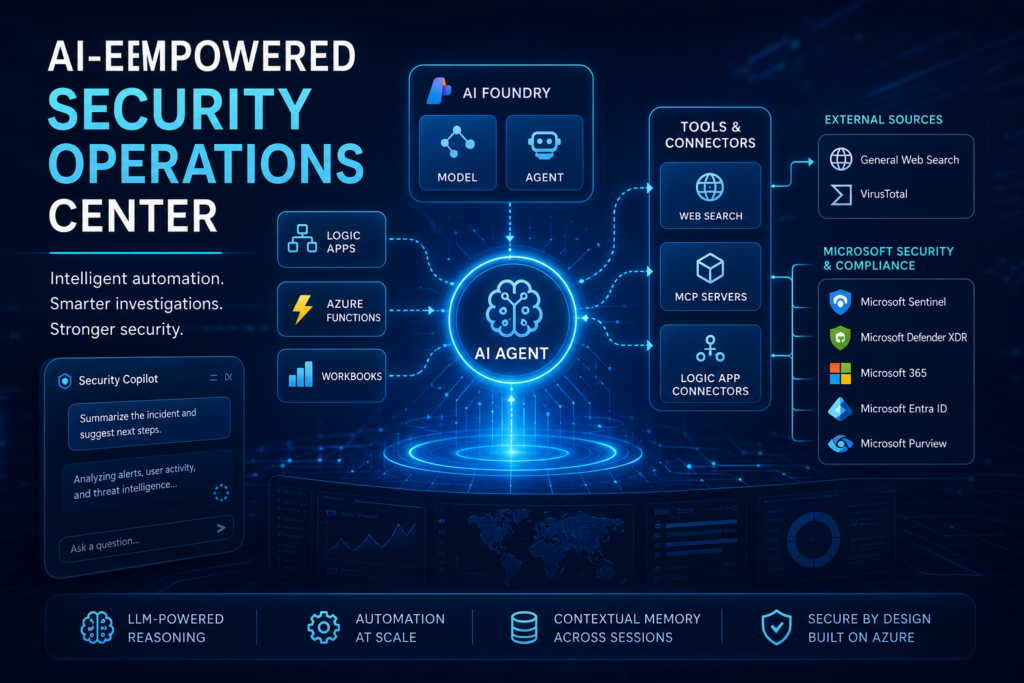
That first implementation leaned heavily on what I would describe as deterministic, structured automation. It allowed natural language interaction and some intelligent behavior, but the flow was still very explicit. Inputs triggered predefined paths. Decisions were bounded. It worked well, and in many cases, it still does.
From there, I stepped back and explored the broader distinction between deterministic logic and agentic systems. That led into a deeper look at Microsoft Sentinel MCP, including what it offers out of the box and where it starts to change how we think about security operations. In the most recent article, I walked through how to evaluate Sentinel MCP using Visual Studio Code.
That evaluation surfaced an important concern. While the tooling itself is powerful, the orchestration layer often relies on a public LLM. Connecting a production Sentinel environment to a public model introduces risk, particularly when you consider the sensitivity of incident data, identities, and log-derived context. For testing, this may be acceptable. For real environments, it is harder to justify.
This is where the direction of the series begins to shift.
In this article, I move into a more controlled and enterprise-aligned approach by using Azure AI Foundry as the orchestration layer. Instead of relying on externally hosted models, we are now working within a private, governed environment where identity, access, and data handling are aligned with the rest of the Azure security stack.
The focus here is straightforward. We are going to stand up a Foundry agent, connect it to Sentinel MCP, and validate that it works as expected. This is about establishing a foundation.
There are still scenarios where deterministic logic is the better tool. There are others where agentic reasoning provides clear advantages. The real value comes from understanding how to combine them into a cohesive model that fits your environment.
What we are building here is designed from the start to be something you could reasonably trust in a real SOC environment.
Getting Started with Foundry and Agents
Before jumping into setup, it is worth briefly grounding what Azure AI Foundry actually is, especially if you are joining this series midstream.
At a high level, Foundry is Microsoft’s platform for building and hosting enterprise-ready AI applications and agents. It provides a controlled environment where you can deploy models, manage access through Entra ID, define tools, and orchestrate how those tools are used. Unlike public LLM interfaces, Foundry is designed to sit inside your existing security and governance boundary, which is what makes it viable for security operations.
Foundry gives you the same capabilities as a top-tier public LLM like ChatGPT or Gemini, but privately hosted within your own environment and security boundary.
In practical terms, Foundry gives you three things that matter here:
- A private model execution environment
- A framework for defining agents that can take action
- The ability to connect those agents to real systems and data sources
Up to this point, we have been stitching together intelligence using deterministic, workflow-based orchestration in Azure, primarily through Logic Apps and supporting services. Foundry changes that model. Instead of defining every step ahead of time, you define capabilities, tools, and boundaries, and allow an agent to decide how to act within them.
A Foundry agent is not just a prompt wrapped in a UI. It is an orchestrator that can maintain context across interactions, select and invoke tools dynamically, and apply reasoning to decide what to do next.
The important shift is this:
Instead of building flows that call an LLM, we are building an LLM-driven system that calls our tools.
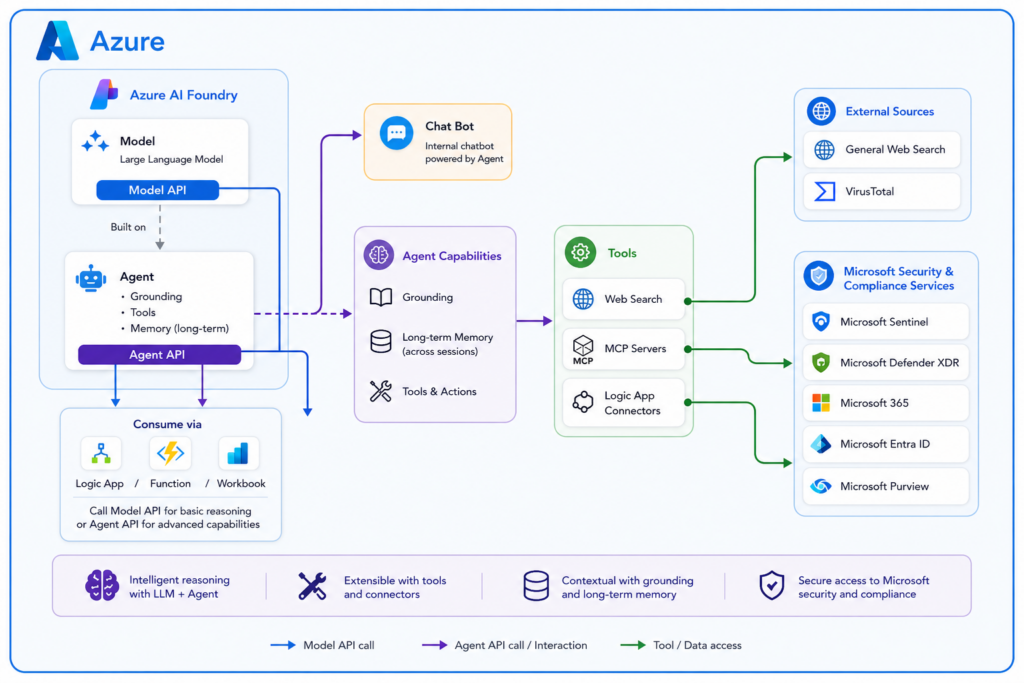
The diagram above illustrates an Azure-based architecture where Azure AI Foundry hosts a large language model alongside a Foundry-managed agent built on that same model. Both expose API endpoints, allowing services such as Logic Apps, Azure Functions, and Workbooks to either call the model directly for basic reasoning or invoke the agent for more advanced, context-aware operations. The agent extends the model with grounding, tool access, and optional memory across sessions, enabling it to act as the reasoning layer behind automation workflows or internal chatbot experiences. Through its tool connections, the agent can interact with Microsoft security platforms such as Sentinel, Defender XDR, Entra, and Purview, as well as external data sources and services, providing a centralized and extensible intelligence layer within the Azure environment.
Creating Your First Foundry Agent
At this point, I am assuming you already have a Foundry instance deployed and accessible.
From the Foundry portal, navigate to your project and create a new agent. The interface walks you through the basics, and the defaults are generally fine for a first pass. What matters most is not the model selection or minor configuration details, but how you define the agent’s role.
For the initial setup, keep the instructions simple and focused. Think in terms of intent rather than control logic. For example, you might describe the agent as responsible for assisting with security investigation, incident understanding, and entity analysis.
You do not need to tell it how to perform those actions yet. That will come from the tools we attach.
You will also notice options to publish directly into Microsoft Teams or Microsoft 365 Copilot. That effectively turns the agent into a chatbot experience. That is not the goal here. Not yet anyway, thought adding a chatbot can be an important addition to you SOC-AI toolkit.
In this implementation, the agent is being built as a backend decision engine, not a user-facing chatbot.
Taking a Closer Look at Agent Setup and Settings
Once the agent is created, Foundry drops you into a playground backed by the agent configuration, and this is where most of the real setup happens.
The agent is tied to a model deployment, but the model itself is just the foundation. The agent layers on instructions, tools, and optional memory. Without those, you are essentially just calling a model endpoint.
In simple terms, the agent is a more capable version of a standalone model endpoint. It layers in grounding, web search, tool connections, and even long-term memory, and makes all of that available as either a chatbot experience or a callable API within your environment.
From a configuration standpoint, the most important setting is the instructions (system prompt). Focus on intent rather than detailed logic. The tools you attach will define what the agent can actually do.
The tools section is where things become powerful. You can use built-in tools, connect to MCP endpoints, or add custom APIs. One key capability is that Logic App actions can be exposed as tools, allowing the agent to trigger deterministic workflows without embedding that logic directly in the model.
You will also see built-in tools like web search and code interpreter. Web search is enabled by default and is often necessary for retrieving current context, while code interpreter can help with structured data but is optional.
The knowledge and data sections provide grounding. Uploading a file is the fastest way to get started, as Foundry automatically indexes it and makes it available to the agent.
Model behavior settings like temperature and top P both default to 1. For SOC scenarios, lowering temperature can help produce more consistent outputs, which is usually preferred over variability.
You may also see a memory option, depending on region availability. This enables long-term context but is not required for initial setup.
At a glance, setup is simple. The real impact comes from how you define instructions, tools, and scope, which ultimately shape how the agent behaves.
Connecting the Agent to Sentinel MCP
This is where things start to become interesting.
Within the agent configuration, you can add tools or external capabilities. One of those options is connecting to an MCP server. This is where you provide the Sentinel MCP endpoint.
The process is straightforward:
- Add a new tool connection
- Choose MCP
- Provide the Sentinel MCP URL
- Authenticate with Entra ID
Once connected, the agent automatically discovers the available tools exposed by MCP.
What stands out here is how little configuration is required compared to the deterministic approach. There is no need to define queries, build workflows, or map every possible path.
The MCP layer exposes capability, and the agent decides how to use it.
Understanding the Sentinel Tool Options in Foundry
As you browse the tool catalog, you will notice multiple Sentinel-related options. These are not duplicates. They represent different ways of interacting with Sentinel data and capabilities.
The primary options currently visible are:
- Sentinel knowledge objects
- Sentinel data exploration
- Microsoft Sentinel MCP
- Microsoft Sentinel Graph
Sentinel knowledge objects provide access to structured artifacts such as saved queries and rules. This acts as a reference layer.
Sentinel data exploration provides data-level access, allowing the agent to query tables and retrieve raw data.
Microsoft Sentinel MCP represents a broader investigation capability layer, exposing structured operations like incident retrieval and entity analysis. In practice, it appears to encompass much of what data exploration provides and may represent its evolution into a more agent-friendly interface.
Microsoft Sentinel Graph introduces relationship and impact analysis, including path tracing and blast radius evaluation. This appears to be built on top of Sentinel Data Lake graph capabilities.
At the time of writing, there is no public documentation available for Sentinel Graph, and it has not yet been formally released. It is expected to become available through private preview and later general availability. While it is visible in the interface, functionality may be limited depending on tenant configuration.
Understanding Tools, Control, and Behavior
As more capabilities are added, one pattern becomes clear.
Having more tools does not always lead to better results.
While this is not formally documented as a strict limitation, it is a practical observation during testing. As the number of tools increases, the agent’s ability to consistently select the right one can degrade. More options introduce more decision paths.
Foundry provides two key mechanisms to manage this:
- Allowed tools define what the agent can see
- Approval settings define how tools are executed
If a tool is not in the allowed list, the agent does not know it exists. This is a critical control point.
Approval settings determine whether the agent must request permission before executing a tool. In interactive scenarios, this can be useful. In automated workflows, it becomes a problem. If no user is present to approve an action, the workflow will likely fail.
The practical approach is to:
- Limit the agent to a curated set of tools
- Allow those tools to execute without approval
- Handle approvals explicitly in workflow logic when needed
Grounding and Knowledge
In addition to tools, Foundry provides ways to supply additional context through grounding.
This includes:
- File uploads
- SharePoint
- Databases
- External sources
Grounding provides information. Tools provide capability.
This distinction is important.
Grounding answers:
What does the agent know?
Tools answer:
What can the agent do?
In practice, tools can also act as a dynamic form of grounding. The agent will often use tools to gather additional context before responding. For example, it may query Sentinel, look up an entity, or retrieve external intelligence. In those cases, the tool is not just performing an action, it is also enriching the agent’s understanding.
For initial setups, file uploads are often the simplest approach. Foundry automatically indexes the content and makes it available.
Over time, more structured sources like SharePoint may be used to maintain procedures and operational guidance.
Grounded data is treated as authoritative. If procedures change, the agent will follow the updated version. This reinforces the importance of governing your data sources, not just your tools.
Memory and Long-Term Context
Memory adds another dimension to how the agent behaves.
It allows the agent to retain useful context across sessions and improve over time. This can include patterns, preferences, and response consistency.
For this solution, memory has clear value. It can help the agent become more efficient and consistent.
At the same time, memory should be treated as an optimization layer, not a control mechanism.
The practical approach is to enable it, observe behavior, and refine if needed.
Memory is currently a preview feature with limited regional availability. As of May 2026, supported regions include:
Australia East
Brazil South
Canada East
East US 2
France Central
Italy North
Japan East
Korea Central
If you plan to use memory, Foundry must be deployed in one of these regions.
Guardrails and Practical Considerations
Foundry includes guardrails such as jailbreak detection and content filtering.
These are primarily designed for user-facing chatbot scenarios. In a SOC context, they are often less relevant and can introduce false positives.
Security data may contain language that triggers filters even though it is valid. This can disrupt workflows.
For this type of implementation, behavior is better controlled through:
- Instructions
- Tool scoping
- Identity
- Workflow design
Guardrails should be applied selectively.
Where This Leaves Us
At this point, the agent is created, connected, and capable.
It is already behaving differently than the earlier deterministic model. Less rigid. More flexible. Sometimes more effective.
This article is intentionally focused on initial deployment and validation.
In the next article, we will move into practical use cases, exploring:
- How the agent performs in real scenarios
- Where it excels
- Where it breaks down
- How to combine agentic behavior with deterministic workflows in a controlled way
Because standing up the agent is only the first step.
Understanding how to use it effectively is where things actually get interesting.