It has been a while since my last post. Work has been busy, I started a new semester in my applied artificial intelligence program, and I have escaped into a few video games when time permits.
My current course focuses on machine learning operations, or MLOps. While working through this week’s material, I realized that although I regularly use computational notebooks, I had never taken the time to understand them deeply.
Sometimes we mistake familiarity for understanding.

What makes a notebook a notebook? What makes one a Jupyter notebook? Where does the code run? Why are notebooks so closely associated with Python? And are they mainly learning tools, or can they also be used for automation?
Here is what I learned.
What Is a Notebook?
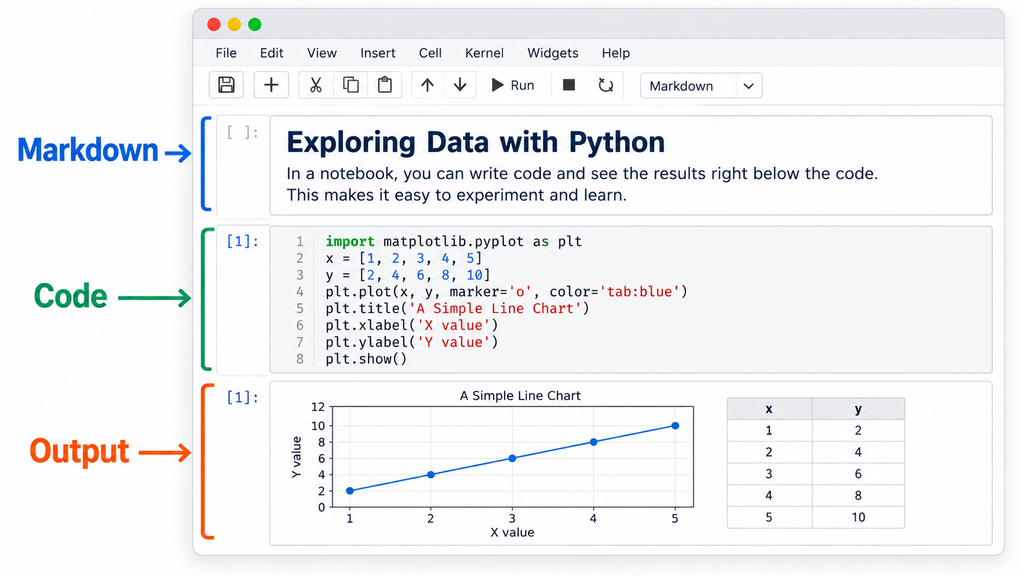
At its simplest, a computational notebook is an interactive document that combines executable code, written explanation, and the results produced by that code.
Traditional source code is usually stored in a file and executed as a program or script. A notebook divides that code into individual sections called cells. One cell might import a library, another might retrieve data, and the next might transform or visualize it.
Between those code cells, Markdown cells can explain what the code does, document assumptions, or interpret the results. Markdown is a relatively simple way to format text using plain-text symbols. Similar to how HTML describes how content should appear on a web page, Markdown can be rendered into headings, paragraphs, lists, links, bold text, and other familiar formatting.
The output of a code cell can appear immediately below the code that generated it. That output might include text, a table, a chart, an image, a map, an error message, or an interactive visualization.
Interestingly, those results can often be saved as part of the notebook itself. When someone else opens it, they may be able to see the output from its previous execution without running the code again. This is useful when teaching, completing an assignment, documenting an experiment, or showing someone what the expected results should look like.
Saved output should not automatically be treated as current or trustworthy. It represents what happened during a previous execution, possibly using different data, code, dependencies, or compute. Still, it can be a valuable reference.
A notebook is not simply code. It is code presented as a documented, executable, and shareable story.
What Makes a Notebook a Jupyter Notebook?
I had generally associated notebooks with Jupyter, but the terms are not interchangeable.
A notebook is the broader concept. Jupyter is a particular open-source notebook architecture, document format, and ecosystem.
A Jupyter notebook normally uses the .ipynb file extension. Underneath that extension is a JSON document containing the notebook’s cells, metadata, execution information, and potentially its saved outputs. An .ipynb file is not just a Python script with a different filename. The Jupyter notebook format formally defines how text, source code, rich output, and metadata are stored within cells.
A Jupyter environment generally includes several related components:
- The notebook document stores the code, narrative, metadata, and saved output.
- The notebook interface allows someone to edit and interact with the document.
- A kernel interprets and executes the selected language.
- The underlying compute supplies the CPU, memory, storage, and possibly GPUs needed to perform the work.
The interface might be JupyterLab, Visual Studio Code, Azure Machine Learning, Amazon SageMaker, or another compatible environment. The kernel might execute Python, R, Julia, PowerShell, C#, or another language.
Even the name Jupyter reflects three of the languages around which the project initially developed: Julia, Python, and R.
Python is the language most people associate with Jupyter, but Jupyter is not exclusively a Python technology.
Why Notebooks and Python Fit So Well Together
There is a natural alignment between notebooks and Python.
Python is an interpreted language that supports an interactive development style. Code can be submitted, executed, inspected, and revised without compiling an entire application first. A notebook cell is an almost perfect interface for that process.
I can import a library in one cell, load data in another, clean it in the next, and create a visualization farther down the page. The running Python kernel remembers the variables, functions, and libraries created earlier in the session.
Python is also deeply embedded in data science, machine learning, automation, and artificial intelligence. Those are all areas where people regularly inspect data, test ideas, modify part of an analysis, and immediately see what happens.
That does not mean Python requires a notebook. Most operational Python runs outside notebooks.
Python can run as a .py script from a command line. It can power a website, API, background service, serverless function, scheduled process, security tool, or command-line utility. It can run inside a container, an Azure Function, a CI/CD pipeline, or a Kubernetes cluster. Python code can also be organized into reusable modules and packages that are imported by notebooks and other applications.
A notebook is one way to interact with Python, not the place where Python inherently lives.
Running a Notebook
Notebook cells can be executed individually, allowing someone to move through the code one step at a time. This makes it easier to understand what each section does, examine intermediate results, and identify where an error occurs.
Most notebook environments also provide an option to run all cells. When that happens, the cells generally execute sequentially from the top of the notebook to the bottom.
Cells do not have to be run in that order. I can manually rerun a visualization without retrieving the data again, or return to an earlier cell and change a variable. That flexibility is extremely useful during learning, experimentation, and troubleshooting.
It can also create confusion because the kernel retains state. A cell may work because another cell was executed earlier and created a variable in memory, even if the displayed notebook no longer makes that relationship obvious. The visible order of the notebook may therefore differ from the order in which its code was actually executed.
This does not make notebooks inherently unreliable. It simply means the execution history matters.
A finished notebook should ideally pass a straightforward test: restart the kernel, clear its state, and run every cell from beginning to end.
If that fails, the notebook may contain an undocumented dependency, an environmental assumption, a changed file path, or a step that was performed manually. This is not necessarily unusual when retrieving someone else’s notebook from a repository. Different Python versions, library versions, credentials, data locations, and compute environments may require a few adjustments.
Modern development environments are also getting better at identifying these problems. They typically expose the original Python or runtime error, provide debugging and dependency-management features, and increasingly include AI assistants that can explain an error and suggest a correction. These tools can make troubleshooting easier, although they do not eliminate the need to understand what the notebook is doing.
Where Does the Code Actually Run?
One of the most useful distinctions for me was separating the notebook document from the compute that executes it.
The notebook contains the instructions, explanation, and possibly saved results. It does not contain the processing power required to execute those instructions.
When a notebook runs locally in Visual Studio Code, it may use a Python environment installed on the local computer. When it runs in Azure Machine Learning or Amazon SageMaker, it might use an attached virtual machine. Other environments might use a container, managed compute service, distributed cluster, or serverless capacity.
This explains why cloud notebook environments ask users to select or attach compute. The notebook can often be viewed or edited without active compute, but it cannot execute its code without a compatible runtime, CPU, memory, and storage.
The notebook is the document and interface. The kernel and attached compute perform the work.
This creates an interesting path for experimentation. I can develop and test a notebook on my local computer using a smaller dataset without paying directly for cloud compute. For many projects, a local CPU or GPU may be enough.
There is still a practical limit.
I have run class projects locally that required hours to complete. Moving the same work into the cloud does not automatically make it fast. A small or inexpensive cloud resource may take just as long, while a larger CPU or GPU resource may improve performance at a higher cost.
GPUs can significantly accelerate workloads designed to use them, particularly deep learning and other highly parallel computations. They do not make every Python workload faster. Data loading, ordinary scripting, and many traditional machine-learning algorithms may still be constrained by CPU, memory, storage, or the way the code was written.
A common approach is to develop locally with smaller datasets, confirm that the process works, and then move to more capable compute when the real workload requires it.
Compute Can Take Different Forms
Apache Spark often appears in discussions about notebooks, especially in Microsoft Fabric, Azure Databricks, and Azure Synapse. Spark is not a notebook format or interface. It is one of several possible compute engines that can operate behind a notebook.
A normal Python notebook might process data on one computer using that computer’s CPU and memory. Spark can divide larger datasets and processing tasks across multiple workers. The notebook remains where the code is written and explained, while Spark provides the distributed processing underneath it.
The Apache Spark project supports Python, SQL, Scala, Java, and R and is designed to scale work from a local system to distributed clusters.
Spark is not the only possible backend. Depending on the platform and workload, a notebook might use:
- A local Python process
- A virtual machine
- A container
- A managed CPU or GPU instance
- A Spark cluster
- A Kubernetes-based environment
- A serverless or capacity-backed service
Spark becomes useful when the data or processing requirements benefit from being distributed. For a small CSV file or focused analysis, ordinary Python and Pandas may be simpler and faster. There is little value in bringing out heavy construction equipment to move a chair.
Why Notebooks Are So Useful for Learning
Notebooks are particularly valuable when learning Python, machine learning, data science, or another code-driven discipline.
They allow me to move systematically through a process rather than confronting one large script. I can read an explanation, run a small amount of code, inspect the result, and then continue. If something fails, I have a better idea of where it failed and what changed immediately before the error.
They are equally useful when sharing a process with someone else. A notebook can explain not only what code to run, but why it is being run and what the expected results should look like. Someone else can follow the same path, adjust the inputs, and build on the original work.
This is valuable beyond formal education. A security investigation, data transformation, machine-learning experiment, or specialized administrative process can be documented as a series of repeatable steps. Even if the original author moves on, the notebook provides the next person with more than a collection of unexplained code.
Inline visualizations are an important part of this experience. A table, graph, map, image, or model evaluation can appear directly below the code that produced it. The question, method, and evidence can all exist in the same document.
That makes a notebook more than a convenient coding interface. It can become an executable record of how someone reached a conclusion.
Notebooks Can Also Be Automated
Although notebooks are excellent human-facing tools, they do not always require a person to open them and run each cell manually.
Notebooks can be parameterized, called through APIs, scheduled, included in data or machine-learning pipelines, and executed as part of broader automation workflows. They can ingest or transform data, engineer features, train or evaluate models, perform security analysis, create reports, and write results into a database or lakehouse.
They are not normally packaged like an executable file or PowerShell cmdlet, but they can still operate as background components.
Because notebook files can be stored in Git repositories, they can also be versioned, shared, reviewed, and incorporated into CI/CD workflows. There are tradeoffs. The underlying JSON format and saved output can make source-control comparisons noisy, so teams may clear output before committing notebooks or use notebook-aware comparison tools.
Still, the combination of executable code and written context can be valuable operationally. If an automated notebook fails months later, someone can open it, follow the intended process, examine each stage, and better understand what it was supposed to do.
As the logic becomes more complex or reusable, it may make sense to move mature portions into Python modules, packages, services, or formal pipelines. The notebook can then remain a thinner orchestration, analysis, or documentation layer.
Exploration can begin in a notebook without requiring production to remain entirely inside it.
Where Notebooks Appear in the Microsoft Ecosystem
On the Microsoft side, notebooks appear in several places aimed at different workloads.
Azure Machine Learning supports model development, experimentation, training, evaluation, and registration using attached CPU or GPU compute.
Microsoft Fabric uses notebooks for data engineering, data science, lakehouse analysis, machine learning, and Spark-based processing.
Azure Databricks uses notebooks extensively for large-scale data engineering, analytics, and machine learning.
Azure Synapse Analytics supports notebooks connected to Apache Spark pools for data engineering and analytical workloads.
Microsoft Sentinel has long supported notebooks for threat hunting, investigations, enrichment, and advanced security analytics. A Sentinel notebook can retrieve security data, enrich entities through external sources, apply Python analytics, visualize relationships, and document the investigative process.
Visual Studio Code can edit and execute Jupyter notebooks locally or connect to remote environments. Its Jupyter support includes code completion, debugging, syntax checking, rich output rendering, and export to formats such as HTML and PDF.
These environments may look similar because they all present code in cells, but what happens beneath the interface can be different. One might run Python on a local computer, another on a managed virtual machine, and another through distributed Spark compute.
A Better Mental Model
The simplest definition I arrived at is that a notebook is an interactive, executable technical document.
It combines narrative, code, visualization, and results. A Jupyter notebook is one particular implementation of that idea, based on the Jupyter document format and its communication with a language-specific kernel.
Python fits naturally into this environment because of its interpreted and interactive nature, but Python can run almost anywhere, and Jupyter supports many other languages.
The notebook stores and presents the analytical story. The kernel interprets the code. The attached compute performs the work. That compute may be a local CPU, a GPU-enabled cloud instance, a Spark cluster, or another execution environment.
Notebooks are particularly effective for learning, experimentation, technical communication, and repeatable analysis. They can also participate in automated and production workflows when designed appropriately.
This week’s research did not completely change how I use notebooks. It did give me a much clearer picture of what happens when I press the Run button.
Sometimes that is the value of stepping back to study a familiar technology. We stop treating it as a magical box that happens to work and begin to understand the layers that make it work.