A customer recently asked why their prompt-injection tests weren’t generating alerts.
They were sending unusual prompts to an agent and watching those requests get blocked. But when they checked the monitoring system, the alerts they expected weren’t there. Their immediate reaction was concern and confusion. If the system recognized something worth blocking, why hadn’t it generated an alert?
Explaining that behavior required a closer look at where prompt protection, monitoring, and alerting actually occur. It also exposed something I hadn’t fully understood about how those capabilities fit together.
Start with the control planes
Every agent has to run somewhere. That could be Microsoft Foundry, Copilot Studio, Amazon Bedrock, or a local process on someone’s laptop.
The hosting environment is generally the best place to apply prompt protections. It is close to the activity and can intervene directly. Sending every interaction elsewhere for inspection can introduce processing, network dependencies, and latency.
But the hosting environment is only one control point. From an organizational perspective, there are five primary places where we can monitor or control an agent:
| Control plane | What we can control |
|---|---|
| Identity and permissions | Who can invoke the agent and which resources the agent can access. |
| Agent code | What detailed activity the agent reports and whether it participates in enforcement. |
| Hosting platform or device | Which agents, models, tools, grounding sources, and guardrails are allowed. |
| Network gateway or proxy | Communications that pass through that gateway. |
| Destination service or MCP tool | Whether the receiving service permits the requested action. |
Every agent security product operates through some combination of these control planes. The differences are which ones it prioritizes, how deeply it integrates with them, and whether it can only observe activity or actually interrupt it.
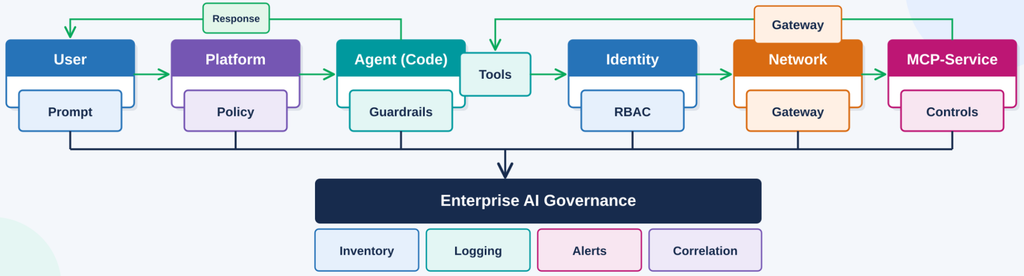
The ability to observe an agent does not automatically provide the ability to interrupt it. Enforcement requires control over at least one of these points.
Identity and permissions
Identity establishes who can access an agent and what the agent is allowed to do.
An agent might act with the user’s delegated permissions, use its own identity, or authenticate to a service with an API key or another credential. Each identity has its own permissions, policies, and audit trail.
In the Microsoft environment, Entra provides controls for user access and agent identities. We can restrict who can invoke an agent, limit its permissions, what data can access, monitor its authentication activity, and disable its identity when necessary.
A malicious prompt cannot independently grant an agent permissions it does not already possess. Its potential impact is constrained by the identities and permissions available to the agent and its tools.
Agent code: telemetry and enforcement
The agent’s code presents two distinct opportunities: collecting detailed telemetry and participating in enforcement.
Code-level instrumentation can provide the most complete view of what is happening inside the agent. An SDK or OpenTelemetry integration can report prompts, responses, tool calls, identities, permissions, errors, and other runtime activity to a central monitoring service.
Code-level telemetry gives the monitoring service an inside view of the agent rather than forcing it to infer activity from the outside.
The drawback is that it requires integration with the agent. That change might be difficult to implement, particularly across agents built with different frameworks or managed by different teams.
As these platforms mature, this process should become easier and more standardized. Hosting platforms may increasingly provide detailed telemetry automatically, allowing agents to share activity with central monitoring services without requiring code changes.
Code-level integration can also be used for enforcement, but that is a separate function. Some products require the agent to send prompts, tool interactions, or responses to a central service for validation before allowing them to proceed.
That approach moves the security decision away from the agent or hosting platform and into a centralized inspection service. It can provide consistent enforcement across different environments, but it also adds latency and creates an availability dependency. If the inspection service becomes unavailable, the agent must either stop, bypass the inspection, or follow some predefined fallback behavior.
Hosting platform or device
The hosting platform is usually the first line of prompt protection.
Managed platforms such as Microsoft Foundry, Copilot Studio, Agent Builder, and Amazon Bedrock provide their own guardrails and prompt-protection capabilities. A local agent can similarly be protected through controls on the device where it runs.
These protections are close to the source. Depending on the platform, they can prevent an unwanted prompt from being processed, stop an inappropriate tool call, or prevent an unsafe response from reaching the user.
Consider an employee asking an agent to summarize an email. The request itself is legitimate, but the email could contain hidden instructions intended to redirect the agent. The employee did not ask the agent to follow those instructions. They arrived inside material the agent was expected to read.
Platform protections can inspect the user’s prompt and retrieved content. They can attempt to distinguish legitimate instructions from content designed to manipulate the agent.
The platform also governs how agents can be created and configured. An organization may be able to control:
- Who can create or modify agents
- Which models are permitted
- Which MCP servers and tools can be used
- Which grounding sources are allowed
- Which authentication methods and identities are acceptable
- Which safety settings and guardrails must remain enabled
Platform governance is broader than prompt filtering. It controls the environment in which agents are created, configured, and allowed to operate.
Prompt shields and guardrails should not be treated as perfect or complete protections. They may miss a technique they were not designed to recognize, encounter a workaround, or fail to understand malicious behavior distributed across several otherwise ordinary interactions.
An attacker might progressively influence an agent through a series of prompts, exploit confusion in a growing conversation, or use cascading instructions that become harmful only when considered together. Context limits and changes in how earlier instructions are interpreted can also create opportunities for manipulation.
Prompt-based memory poisoning is another example. Instead of causing one immediate unwanted action, a malicious prompt attempts to influence information the agent retains and uses in later interactions. Prompt protections may recognize and stop some of these attempts, but the memory system, its permissions, and how stored information is validated remain important.
A guardrail can evaluate an immediate interaction. Centralized enterprisemonitoring can look for patterns across users, agents, sessions, tools, and time.
The platform can also be assessed for configuration weaknesses. Are its guardrails enabled? Have they been weakened? Does the agent have excessive permissions? Is the environment compliant with organizational standards?
Unwanted behavior can occur because a protection is missing, configured incorrectly, deliberately lowered, or unable to recognize the complete pattern. Strengthening the platform controls helps prevent many problems at their source, but it does not eliminate the need for broader visibility.
Network gateway or proxy
A gateway provides a control point similar to a firewall or web proxy.
It can inspect communications, restrict destinations, apply organizational policies, and collect activity logs. Depending on its capabilities, it might show which APIs, websites, models, or MCP servers an agent communicates with.
A gateway is effective only for traffic that passes through it. If an agent can bypass the gateway, that activity also bypasses its monitoring and enforcement. Organizations therefore need a reliable way to route the relevant inbound or outbound traffic through it.
A gateway cannot protect or record traffic it never sees.
In Microsoft environments, Azure API Management can provide AI gateway capabilities for supported Foundry scenarios. Global Secure Access provides gateway capabilities for supported Copilot Studio traffic and network visibility for activity originating from managed devices.
These are optional, complementary services. Agent 365 does not inherently require a Microsoft gateway or proxy.
Externally hosted agents might use a gateway supplied by their hosting platform, an enterprise proxy, or a gateway provided by a third-party AI security service.
Destination services and MCP tools
The final control point is the service the agent is trying to reach.
A destination service can decide whether an identity is authorized to perform an action. An MCP server can limit which tools are exposed, which callers may use them, and which requests are allowed.
Even if an unwanted instruction reaches the agent and produces a tool call, the destination can still reject that call.
We can evaluate whether the agent is allowed to use the tool, perform the requested operation, or access the requested information. An agent conducting research might be prohibited from visiting certain websites, connecting to particular MCP servers, or invoking specific MCP tools.
The destination can also record what the agent attempted to do. Those logs can support monitoring and later investigations.
One last consideration here is that we can also monitor which agents our users are interacting with from a user’s point of view. We can see, in some cases, what prompts and responses are shared with those agents, what files might be shared, and how often they’re being used from a user’s perspective (even without visibility into the agents themselves).
Protect the entire interaction
These control planes work together across the agent’s interaction.
Identity and permissions determine who can use the agent and what the agent can access.
Code-level and platform controls inspect the prompt and retrieved content. The platform, gateway, and destination service can then evaluate tool calls, operations, and destinations.
Finally, code-level or platform controls can inspect the response. Even an acceptable question can produce an answer that should not be delivered, such as sensitive information, malicious instructions, or content that violates organizational policy.
The objective across these stages is consistent: reject prompts, tool calls, and responses that do not meet our requirements. The resulting activity and protection decisions can also be recorded for review.
What enterprise monitoring adds
Enterprise AI monitoring provides a broader view across agents, identities, platforms, devices, gateways, and destination services.
It monitors configuration as well as activity. Are the appropriate guardrails enabled? Does the agent have excessive permissions? Is the environment compliant with organizational standards? What information is being shared or accessed?
Monitoring can also identify suspicious patterns that a single protection decision might miss. Progressive manipulation across several interactions, for example, may not be evident from one prompt.
There is also value in observing AI use from outside the agent itself. Endpoint and cloud activity can indicate which AI services users or local agents are communicating with.
Depending on the available visibility, monitoring might identify the agent, process, destination, API, MCP service, or files involved. In some scenarios, richer telemetry can include prompts and other details. In others, we may only know that the communication occurred.
Think of this as an outside observer watching the interaction. The observer may not see every word of the conversation, but knowing who communicated, which application was involved, where the communication went, and what resources were accessed can still be valuable.
Services such as Defender for Endpoint and Defender for Cloud Apps can contribute this type of visibility from the device, application, and network perspectives. That helps identify approved and unapproved AI use, relate activity to a user or device, and provide context for investigation.
Monitoring across these sources can reveal activity that the platform guardrails missed, behavior those guardrails were unable to prevent, or interactions occurring on systems that were not configured according to organizational standards.
The same records support investigations after the fact. We may need to reconstruct which identity an agent used, what it accessed, which tools it invoked, and what happened before or after a particular event, even when no alert was generated at the time.
Local protection makes an immediate decision. Enterprise monitoring looks for the broader story.
Inside and outside the Microsoft environment
Microsoft has closer integration with its own agent platforms and security services. That creates opportunities to collect activity, assess configuration, and enforce protections through supported platform integrations.
For supported Microsoft-native scenarios, platform protections provide the first line of defense. Agent 365 and the associated security services add centralized discovery, governance, posture assessment, monitoring, investigation, and runtime protection.
When Agent 365 monitors services outside the Microsoft ecosystem, the same control-plane framework applies, but the available integrations differ. The external hosting platform’s guardrails remain the first line of prompt protection.
Microsoft can connect to supported platform APIs to discover agents and assess their configuration. Deeper activity monitoring may require instrumentation in the agent’s code. External agents can be registered with Agent 365, connected to Agent Identity, and instrumented with OpenTelemetry for deeper analysis of their activity.
Microsoft can also apply controls when an externally hosted agent uses a Microsoft identity, accesses a Microsoft resource, or invokes a supported Microsoft MCP tool.
That visibility does not provide unrestricted control over an external runtime. Microsoft can intervene only where it has an enforceable connection to one of the control planes.
What Agent 365 real-time protection actually does
The guardrails built into Microsoft AI services and Defender’s real-time protection are related, but they are not the same control. There is real-time protection, and then there is threat protection.
Supported Microsoft platform protections, including Prompt Shields, can detect or block activity close to the agent. Those protection events can be sent to Defender and recorded as behaviors.
Agent 365 also collects observability data about agent activity. Defender analyzes that telemetry for suspicious behavior and can generate near-real-time threat alerts when activity meets its detection criteria.
Threat protection is the alerting capability based on collected activity. Real-time protection audits interactions and can block interaction with certain supported MCP servers.
In the Agent 365 cloud-agent protection experience, the default real-time rule operates in audit mode. Matching activity is recorded as behaviors. Separate threat detection evaluates the observability data and can generate alerts when the activity is considered alert-worthy.
Custom rules can add blocking at supported intervention points. For the Work IQ MCP path, that includes supported tool invocations and customer MCP tools onboarded to Agent 365. Other documented protection paths exist for Foundry, Copilot Studio, and local agents.
Agent 365 generally does not generate threat alerts for activity that has already been blocked. The blocked activity is recorded as a behavior, but it is unlikely to generate a separate alert because the protection has already intervened.
This distinction helps protect the security operations team from being overwhelmed by alerts that do not require immediate attention. An activity that was already stopped may still be important evidence, but it does not necessarily need to become another item in the alert queue.
Blocked activity can remain available for investigation without creating an immediate SOC alert.
If the user or agent later becomes suspicious, analysts can review those earlier behaviors as part of the broader investigation. A protection event that did not justify an alert on its own might become relevant when correlated with later activity.
When a blocking rule covers an agent, near-real-time detection alerts are not generated for that agent. The blocked activity remains recorded as behaviors.
That creates a result that may initially seem counterintuitive: audit mode can produce more alerts, while block mode can produce fewer alerts because matching activity is stopped and recorded instead.
Defender documents detection categories including jailbreak attempts, indirect prompt injection, malicious content propagation, secret or credential leakage, evasion, and suspicious access. An unusual prompt does not automatically generate an alert. Microsoft does not publish the complete detection logic or thresholds used to determine when activity becomes alert-worthy.
For the customer testing Agent Builder, the rejected prompts showed that Prompt Shields were working. The activity was recorded as behaviors and was unlikely to generate an alert because it had already been blocked.
How third-party products compare with Agent 365
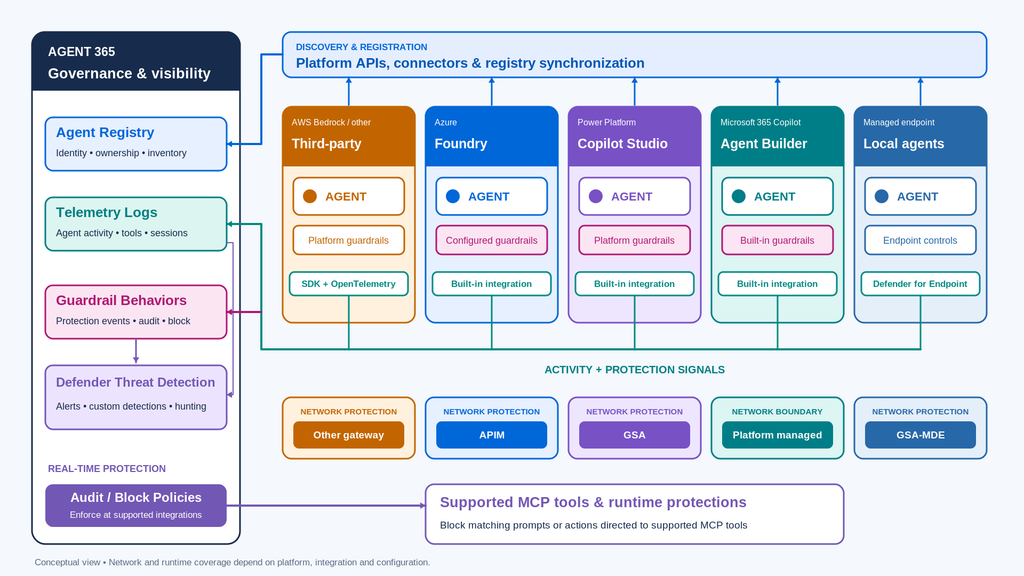
Non-Microsoft AI governance and security products are constrained by the same basic control planes.
They need access to an identity, the agent’s code, its hosting platform, a gateway, or a destination service to observe or control activity. The comparison is about which control planes a product prioritizes and what it does with that access.
Some products emphasize platform API integrations for discovery, configuration analysis, compliance reporting, and maintaining an agent registry.
Others emphasize gateways or proxies. They require relevant communications to pass through a central control point where prompts, tool interactions, and responses can be inspected.
Some products, including Agent 365, require a code-level SDK or instrumentation change. That integration might collect telemetry, connect the agent to an identity or tooling system, send content to a central inspection service, participate in enforcement, or perform several of these functions.
Central inspection (sending prompts to a central evaluation service before they are allowed) provides another opportunity to stop unwanted activity, but it also introduces processing, network dependencies, and potential latency. Depending on the environment, that may close a meaningful gap or duplicate protections already provided by the hosting platform.
Agent 365 emphasizes its built-in connections to Microsoft-hosted agents, platform API integrations, identities, supported service boundaries, and optional developer instrumentation. Customers can supplement those capabilities with Global Secure Access, Azure API Management, or other network controls, but those gateways are not inherently required by Agent 365.
When comparing products, the most useful questions are:
- Where does the product observe activity?
- Where can it intervene?
- What integrations does it require?
- What traffic or activity can bypass it?
- Does it send prompts to a central evaluation service?
- Does it require platform API connectivity, agent-code integration, a gateway, or some combination of them?
The control planes do not change with the product. What changes is how the product uses them.
Test the control, then look for its evidence
When testing prompt protections, identify which control should respond. Is the test intended to validate a platform guardrail, identity restriction, code-level inspection, gateway policy, supported tool-protection rule, or threat detection?
Then identify the expected evidence. It might be a rejected prompt, denied tool call, behavior record, or alert.
In the scenario that prompted this discussion, the customer was testing an Agent Builder agent with malicious prompts. The built-in guardrails prevented those prompts from successfully manipulating the agent’s behavior.
The activity was recorded, but alerts were not generated because the requests had been blocked and the remaining activity was not sufficient to trigger alerting.
The absence of an alert created concern, but it did not mean the protection had failed. It meant the platform protection, behavior record, and threat-alerting system had produced different outcomes.
A protection decision, a recorded event, and a security alert are different outcomes. Understanding where each occurs makes it much easier to determine whether a test worked and where a real protection gap remains.
As I’ve said before, Microsoft customers will greatly benefit from using Agent365 to help them monitor and secure the agents hosted inside of the Microsoft platform. Because of its native integration, it is the platform security tool for Microsoft agents. The question organizations face is not whether or not to use Agent365, but whether or not Agent365 will become their enterprise AI governance solution. And the best choice for your enterprise governance solution is the one that is closest to the majority of your agents. If all your agents are with Microsoft, then Agent365 is a good bet. If all of your agents are elsewhere, you might have a better argument for a third-party AI governance solution.