Microsoft first announced Sentinel Data Lake in July 2025 and immediately generated a lot of interest across the security community.
The value proposition was compelling:
- Lower-cost ingestion options
- Reduced long-term retention costs
- New capabilities built on top of the lake
- The ability to keep more data for longer periods of time
For many organizations, especially those collecting hundreds of gigabytes or even terabytes of data per day, Sentinel Data Lake looked like the next logical evolution of the platform.
Then reality set in.
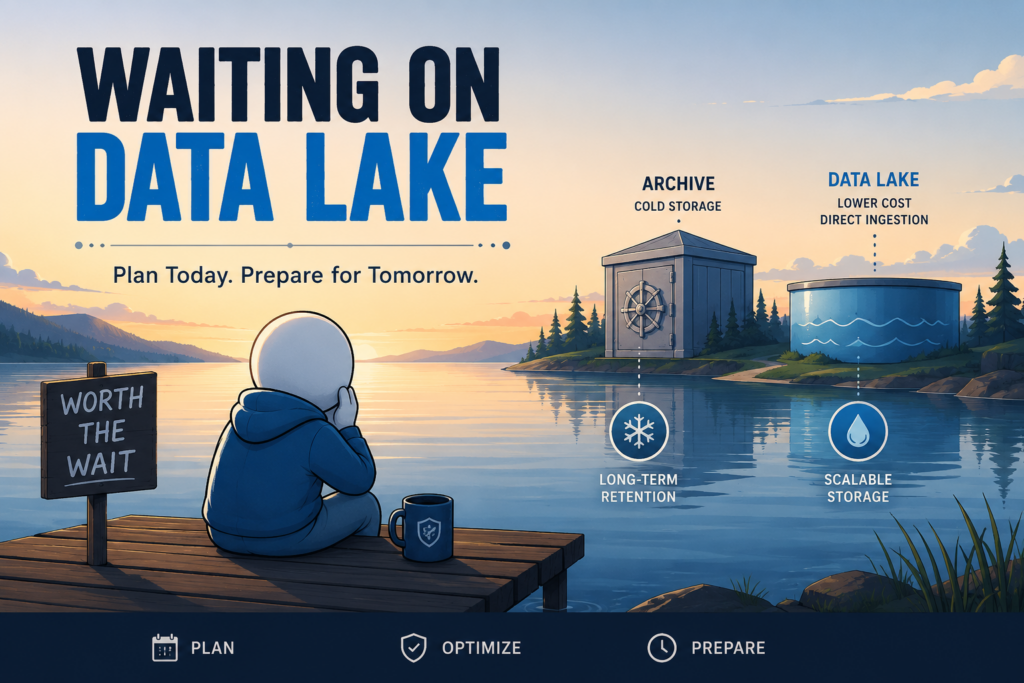
Many customers quickly discovered that Sentinel Data Lake wasn’t available everywhere, and even in supported regions, capacity constraints could prevent immediate adoption. Organizations that had been eagerly waiting to evaluate the service suddenly found themselves unable to enable it.
If you’re in that situation today, my recommendation is to proceed with Log Analytics retention and archival planning, knowing that there is a straightforward migration path when Data Lake eventually becomes available in your region.
The Airplane Wi-Fi Problem
I once heard a comedian joke about being on one of the first flights with free Wi-Fi. Halfway through the flight, the Wi-Fi stopped working and passengers were furious.
The funny part was that nobody had Wi-Fi on airplanes a week earlier.
Sentinel Data Lake sometimes feels the same way. Microsoft generated a lot of excitement around the service beginning in 2025. If your region doesn’t support it yet, or capacity isn’t available, it’s easy to feel like you’re missing out on something essential.
Location Still Matters
One of the less obvious challenges with Sentinel Data Lake is that your Sentinel workspace must reside in a supported region.
For new deployments, this usually isn’t a major issue to rebuild in a supported region. For established environments, moving to a new region is not really an option.
As a result, many organizations find themselves waiting for regional support or available capacity rather than simply enabling the feature.
What Are You Actually Missing?
The biggest benefit of Sentinel Data Lake is direct lake ingestion (direct ingestion).
Data that is sent directly into the Data Lake costs significantly less to ingest than data sent to the Analytics tier. For organizations collecting large volumes of data, especially data that is rarely queried or doesn’t participate in active detections, the savings can be substantial.
The second major benefit is reduced long-term retention costs.
Microsoft applies 6:1 compression to data stored in Sentinel Data Lake. This reduces the effective storage footprint and can significantly lower long-term retention costs.
It is important to remember, however, that Sentinel customers have been solving long-term retention requirements for years using Log Analytics archive retention and Azure Data Explorer (ADX). Data Lake introduces a potentially more economical and integrated approach, but it is not the only option available.
The third benefit is new platform capabilities.
Microsoft continues building new experiences on top of Data Lake, including notebooks, portions of Sentinel MCP, graph-based investigation capabilities, and other emerging features.
These are valuable additions and worth watching closely.
None of these features are prerequisites for operating a successful SOC.
Most organizations will find the direct ingestion savings far more impactful than any individual feature currently built on top of the platform. These are good features, but they are not critical to operational success.
The Retention Options You Already Have
Before Data Lake, there was Archive.
In fact, Sentinel has relied on Log Analytics retention capabilities for years.
Today, organizations already have access to:
- 90 days of included Sentinel retention
- Extended interactive retention for up to two years
- Archive retention for up to twelve years
These settings can be configured independently for each table and are remarkably easy to manage.
Not every table needs years of immediately accessible data. At the same time, many organizations underestimate how valuable extended interactive retention can be.
Personally, I recommend keeping most Sentinel data in interactive retention for at least one year whenever practical. The convenience of immediately querying historical data usually outweighs the relatively modest retention costs. The larger and more expensive tables may require a different strategy, but for the majority of tables, keeping the data readily accessible simplifies investigations considerably.
Archive retention serves a different purpose.
Think of archive as cold storage, or deep freeze. Once data moves into archive, it can no longer be queried directly. Instead, the data must be restored back into the Analytics tier before it can be used. That restore process takes time and incurs additional costs.
For that reason, archive works best for compliance, regulatory, and rarely accessed historical data rather than day-to-day investigative workflows.
Data Lake Changes How We Think About Cost and Retention
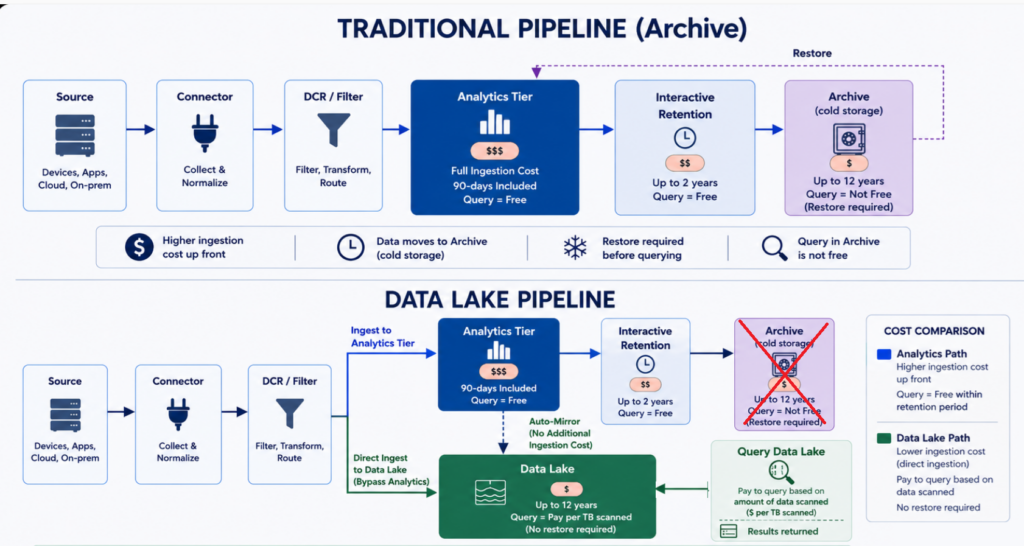
Traditional Sentinel pricing is primarily ingestion-based. Data is sent into the Analytics tier, and once it arrives, analysts can query it as often as needed. Dashboards, analytics rules, workbooks, automation, investigations, and hunting activities can all leverage that data without generating additional query charges.
For years, many organizations wanted a way to bypass the higher cost of Analytics tier ingestion and send data directly into a lower-cost Archival tier. The argument was simple: not every dataset was actively being used for detections, dashboards, investigations, or analytics. Some datasets were being retained primarily for compliance, audit, regulatory, or historical purposes.
Microsoft’s first attempt at solving this problem came in the form of Basic Logs and later Auxiliary Logs. These lower-cost ingestion tiers reduced storage costs but came with limitations around query capabilities and overall functionality. While both options remain available today, they never became the preferred archival strategy for most Sentinel deployments.
Sentinel Data Lake introduces a different approach.
Instead of creating a reduced-functionality version of Log Analytics, Data Lake provides a dedicated long-term retention platform that supports direct ingestion, lower storage costs, and direct access to retained data without requiring a restore operation.
Another important distinction is that when data is sent into the Analytics tier, it is automatically mirrored into the Data Lake. There is no additional ingestion charge for that mirrored copy. This means organizations can continue using Analytics tier data for detections, dashboards, automation, investigations, and reporting while simultaneously maintaining a copy in Data Lake for long-term retention.
For many organizations, this becomes the most compelling capability. Large datasets that are rarely used for detections, dashboards, or operational reporting can be retained at a much lower cost without consuming Analytics tier ingestion capacity.
Query Costs Require Some Planning
One of the biggest differences between Analytics and Data Lake is that querying the Data Lake costs money.
Fortunately, most queries are inexpensive.
The challenge is understanding what drives cost.
Data Lake query charges are primarily based on the amount of data scanned. In practice, the two biggest factors are usually:
- The table or tables being queried (the size)
- The timeframe included in the query (the duration)
This is important because the amount of data returned does not determine the cost.
A query that returns a single result may cost the same as a query that returns millions of results if both queries scan the same amount of data. Likewise, a query that returns no results at all still incurs a charge because the data was scanned.
Anyone who has spent time writing KQL knows that developing a query is often an iterative process. You write a query, review the results, make adjustments, and run it again. Then you repeat the process until you get exactly what you need.
Unfortunately, poorly scoped queries can become expensive when repeatedly executed against very large datasets.
This does not mean Data Lake should be avoided.
It simply means Data Lake should be used intentionally.
Analytics tier remains the better location for high-frequency workloads such as dashboards, analytics rules, reporting, and automation. Data Lake shines when organizations need access to historical data, compliance records, long-term retention, and large-scale investigations.
The Best Strategy If Data Lake Isn’t Available Yet
If Data Lake is not available in your region today, my recommendation is simple.
Start with Log Analytics retention and archival.
Configure:
- Interactive retention (90 days included)
- Archive retention (up to 12 years)
- Per-table retention policies
- Data filtering strategies
If you are using Log Analytics archive retention today, that work is not wasted.
When Data Lake is eventually enabled, your existing retention settings become the foundation for your Data Lake retention strategy. Data is not migrated from archive into Data Lake. Instead, new data begins flowing into the Data Lake while older archived data continues aging out according to its existing retention settings.
In practice, the two solutions operate side by side. Your Data Lake gradually grows while your archive gradually shrinks as older data reaches its retention limit and is removed. From an operational perspective, the transition is remarkably seamless because there is no large migration project, data movement exercise, or extensive reconfiguration effort required.
The primary consideration is simply understanding where your historical data resides during the transition period. Data that remains in archive must still be restored before it can be queried, while newer data retained in Data Lake remains directly accessible.
The important takeaway is that proceeding with archive retention today is not a temporary workaround. It is the natural migration path into Data Lake.
A Quick Note About ADX
Many larger organizations solved long-term retention challenges years ago using Azure Data Explorer.
If you already have ADX pipelines in place, I would not rush to dismantle them the moment Data Lake becomes available.
ADX integrations typically represent a significant engineering investment. They often support reporting, investigations, compliance requirements, and operational processes that have evolved over multiple years.
Instead, run both platforms side by side.
Compare costs.
Compare performance.
Compare operational workflows.
More importantly, consider maintaining ADX until your Data Lake environment has accumulated enough retention to satisfy your compliance and operational requirements. Once Data Lake has matured and you’ve validated that it meets your needs, you can begin gradually retiring ADX workloads and ingestion pipelines.
Tips for Managing Sentinel Data Lake Query Costs
The goal is not to prevent people from using Data Lake. The goal is to help people use it intelligently.
Limit Data Lake query permissions appropriately. Not every Sentinel user needs direct access to Data Lake. Consider limiting access to trained analysts, threat hunters, and engineering teams that understand how query costs are calculated.
Monitor query activity and coach users. Review query activity regularly and identify inefficient patterns. The objective should be education and optimization, not blame.
Train analysts on Data Lake query behavior. Analysts should understand that query cost is largely driven by the amount of data scanned, not by the number of results returned.
Build a repository of optimized queries. Common investigations should have tested and documented query examples available for reuse.
Develop queries against Analytics first. If the data already exists in Analytics tier, build and validate the query there before expanding the search into Data Lake. You can also build and test queries on a short timeframe before expanding.
Use Analytics whenever possible. Remember that Analytics data is automatically mirrored into Data Lake. If the data exists within your Analytics retention window, there is little value in paying to query the Data Lake copy.
Use Spark notebooks for large-scale analysis. Loading data into a DataFrame and iterating there can be far more efficient than repeatedly rescanning the same Data Lake data.
Be careful with search jobs and KQL jobs. These capabilities are powerful but can move large amounts of Data Lake data back into Log Analytics.
Split data when appropriate. Many organizations benefit from keeping a smaller operational dataset in Analytics while storing full-fidelity records in Data Lake.
Establish an investigation budget. Threat hunting, incident response, legal requests, compliance audits, and historical research all justify costs. Analysts should not be afraid to investigate legitimate security concerns because they are worried about generating a bill.
Final Thoughts
Sentinel Data Lake is a valuable addition to the platform, particularly for organizations struggling with large ingestion volumes and long-term retention requirements. The ability to ingest selected datasets directly into the Data Lake can produce meaningful savings, especially when dealing with a small number of very large tables that contribute disproportionately to overall ingestion costs.
At the same time, Data Lake does not eliminate the need for good cost management practices. Organizations still benefit from reviewing logging levels at the source, leveraging data connector filtering options, using Data Collection Rules where appropriate, reviewing ingestion trends, and making intentional decisions about what data is actually worth collecting.
Most environments will find that only a handful of tables represent the majority of their ingestion volume. Those high-volume datasets may be excellent candidates for direct-to-lake ingestion. Many other datasets will continue to make sense in the Analytics tier because they support detections, reporting, investigations, dashboards, and automation.
Data Lake can absolutely reduce costs, but the savings are heavily influenced by the decisions you make. For many organizations, the biggest value may not be immediate cost reduction at all. Instead, it may be the ability to retain more data for longer periods while gaining access to new capabilities built on top of the platform.
If your region doesn’t support Data Lake today, don’t wait. Build your retention strategy, optimize your ingestion pipeline, and configure archive retention. When Data Lake eventually becomes available, you’ll already be well positioned to take advantage of it.