I was recently asked, how are automation rules managed in the Defender portal when multiple Sentinel workspaces are connected?
I expected the answer to be simple. After all, I’ve spent a significant amount of time working with Sentinel, and not many things in this space come as a surprise anymore.
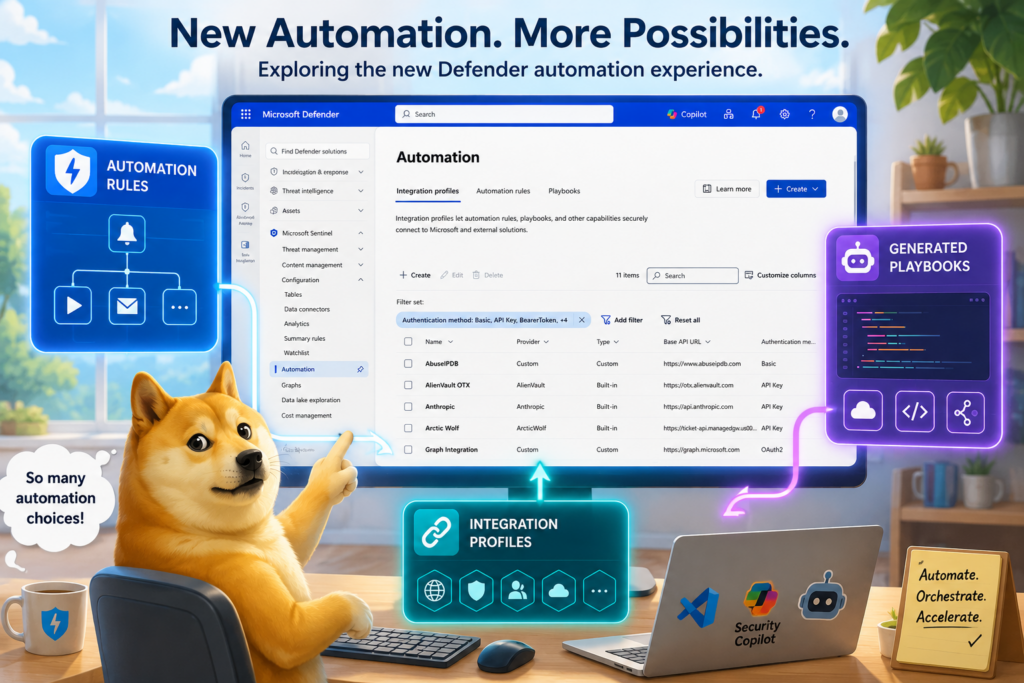
I opened the Defender portal expecting to spend a few minutes confirming how multi-workspace automation behaves. Instead, I found several features I knew very little about: Integration Profiles, Enhanced Automation Rules, and Playbooks created with VS Code.
So let me catch us both up to speed on Sentinel automation.
Before we talk about what has changed, I think it’s worth taking a step back and reviewing how Sentinel automation evolved over the years.
A Brief History of Sentinel Automation
The automation capabilities of Microsoft Sentinel have remained fairly consistent over the years. If anything, the challenge has never been a lack of automation features. The challenge has been turning those features into reliable operational processes. Incident automation has always felt more like a capability than a solution, something many organizations struggle to get right.
There have certainly been improvements along the way. The move from alert-centric workflows to incident-centric workflows was a significant shift. The introduction of automation rules made it much easier to trigger actions automatically based on incident properties and conditions. The core model, however, has remained largely unchanged.
At its heart, Sentinel automation evolved around two concepts:
Automation Rules decide when something should happen.
Playbooks (Logic Apps) are the logic, the script executed in response to a trigger or schedule.
Automation rules can change severity, add tags, assign incidents, update status, or automatically close incidents that meet specific criteria. More importantly, they provide the decision-making layer that determines when automation should be executed.
The playbook is where more advanced automation happens. A common example might be extracting an IP address from an incident, sending it to a third-party service such as VirusTotal for enrichment, and then writing the results back to the incident comments. Other workflows might request approval before taking action, notify a team, create a ticket, or perform a response action.
Not every playbook is tied directly to an incident. Related automation can run on a schedule or respond to other trigger sources. However, incident-triggered automation has historically been one of the defining capabilities of the platform and one of the most common ways customers interact with Sentinel automation.
In the early days, Microsoft and the community published playbooks through GitHub repositories. Customers would locate a template, review the code, deploy it into Azure, and then begin customizing it for their environment. While many organizations appreciated the transparency and flexibility of this model, others were understandably hesitant to deploy automation directly from a public repository.
Over time, Microsoft introduced the Content Hub experience and integrated playbook templates into the Sentinel ecosystem. Installing a solution could make additional playbook templates available, and deploying those templates became significantly easier because the deployment process was integrated directly into the product experience. Though these playbook templates are also available in the GitHub repository for review and direct deployment. Think of the Content Hub as a vetted representation of the repo.
Most playbooks are rarely production-ready immediately after deployment. In my experience, playbook templates are sample code. The templates demonstrated a concept, provided a starting point, or solved part of a problem. From there, the workflow is customized to fit the organization’s processes and operational requirements.
A playbook is simply a Logic App. It can be exported, versioned, reviewed, customized, deployed through infrastructure-as-code pipelines, and stored in source control. That flexibility is one of the biggest strengths of the Logic App model.
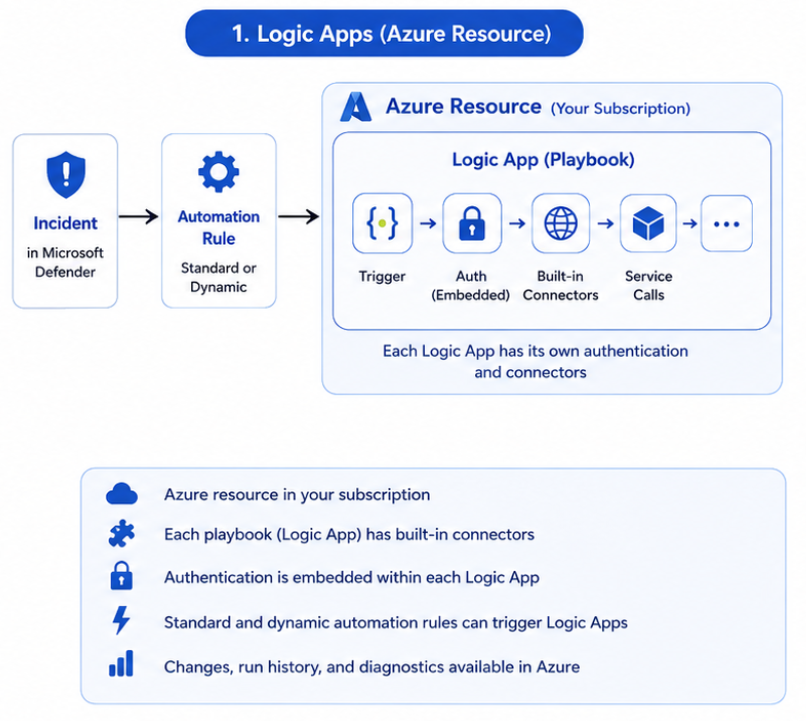
One longstanding quirk of the Sentinel experience is that the playbook inventory is really a Logic App inventory. The portal shows all Logic Apps from the subscriptions you can access, many of which may have nothing to do with security. Development workflows, disabled samples, proof-of-concept projects, and unrelated business automations often appear alongside production security playbooks in the same view.
For years, this combination of Automation Rules and Logic App playbooks defined Sentinel automation.
Which brings us back to the original question.
If Defender is becoming the primary incident response experience across Microsoft’s security ecosystem, what happens to the automation model that Sentinel has relied on for so long?
Opening the Defender Automation Experience
With that question in mind, I opened the Automation section of the Defender portal expecting to find something that looked very familiar.
In some ways, it did.
Automation Rules are still here. Playbooks are still here. Existing Sentinel automation continues to function, and organizations that have invested heavily in Logic App-based automation are not being forced to redesign everything overnight.
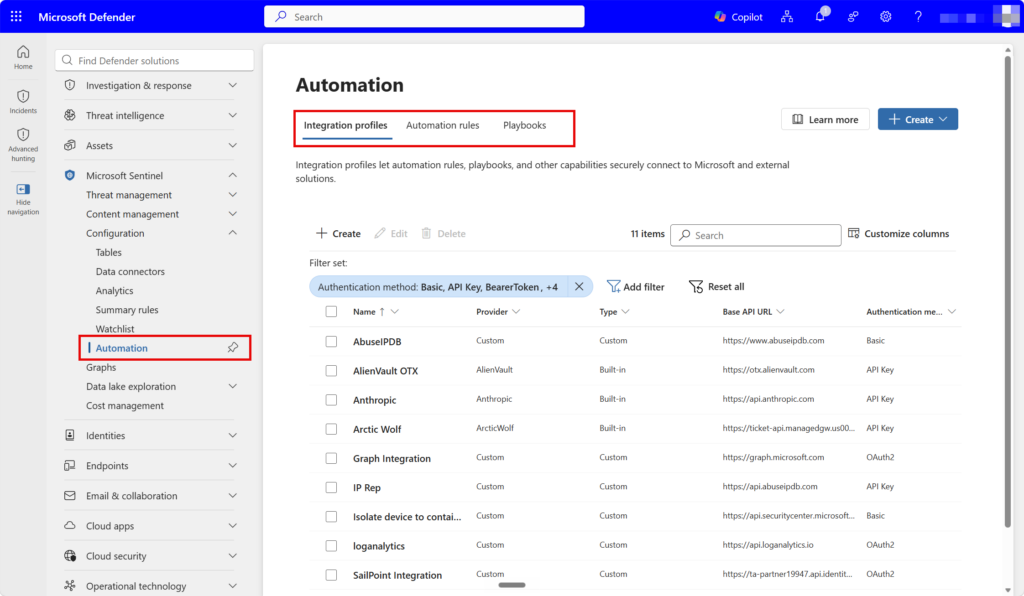
It quickly became obvious, however, that this was not simply the Sentinel automation experience moved into a different portal.
The first thing I noticed is that currently, you can no longer create automation rules from the incidents view. In the Sentinel Azure portal, you could create rules from incidents that were automatically populated with filter criteria for the selected incident. Hopefully that capability will return, but for now you have to use the more generic automation section to create and manage these rules.
There are now two distinct types of automation rules.
The traditional automation rules most Sentinel administrators are familiar with are still present. These rules remain tied to a specific Sentinel workspace, meaning organizations with multiple workspaces still need separate rules for each environment.
These rules support incident creation, incident updates, and alert creation triggers, along with a broad set of conditions based on incident, alert, and entity properties. They can perform a variety of incident management actions and remain the only automation rule type capable of triggering Logic App playbooks.
While these rules are technically Sentinel-centric, Defender and Sentinel incident synchronization means they can still be used to automate any Defender incidents and alerts. In practice, this remains the most mature and flexible automation framework available today.
Alongside them are the new Enhanced Automation Rules, sometimes referred to as Dynamic Automation Rules.
These rules operate at the Defender tenant level rather than being tied to a specific Sentinel workspace. A single rule can evaluate alerts originating from multiple workspaces and multiple Microsoft security products across the unified Defender experience.
What surprised me is that these rules are currently alert-centric rather than incident-centric. Available criteria focus on alert properties such as Alert Title, Alert Severity, Alert Status, Alert Product Name, Custom Detection Name, and Analytic Rule Name. Unlike traditional automation rules, they do not currently expose incident or entity properties.
The action set is also much narrower. Enhanced Automation Rules support only Run Generated Playbook and Update Alert. They cannot trigger Logic App playbooks. Likewise, traditional automation rules cannot trigger Generated Playbooks. The two automation models are currently separate.
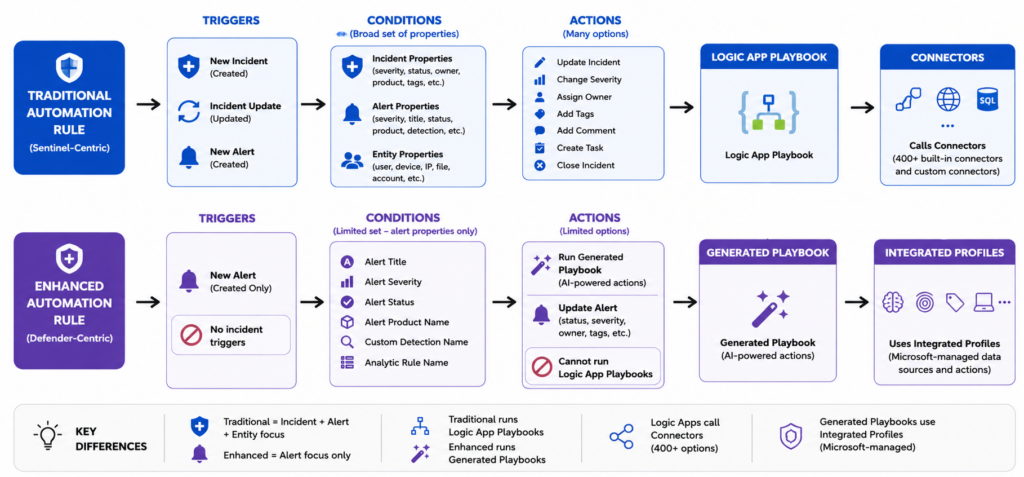
This design suggests Microsoft is building two complementary automation frameworks rather than replacing one with the other. Traditional automation rules remain focused on incident orchestration and Logic App integration, while Enhanced Automation Rules appear optimized for alert enrichment, classification, and AI-assisted triage across the broader Defender ecosystem.
Creating Playbooks with VS Code (Playbook Generator)
As I’ve written before, AI tends to perform better when generating code than when operating inside low-code constraints. That may explain why Microsoft chose a code-first experience rather than attempting to build an AI-assisted Logic App designer. AI-generated workflows have been a long-awaited capability.
Instead of opening Logic App Designer, Defender launches a Playbook Generator powered by Security Copilot, Cline, and VS Code. Security Copilot is required, though SCUs are not consumed during development.
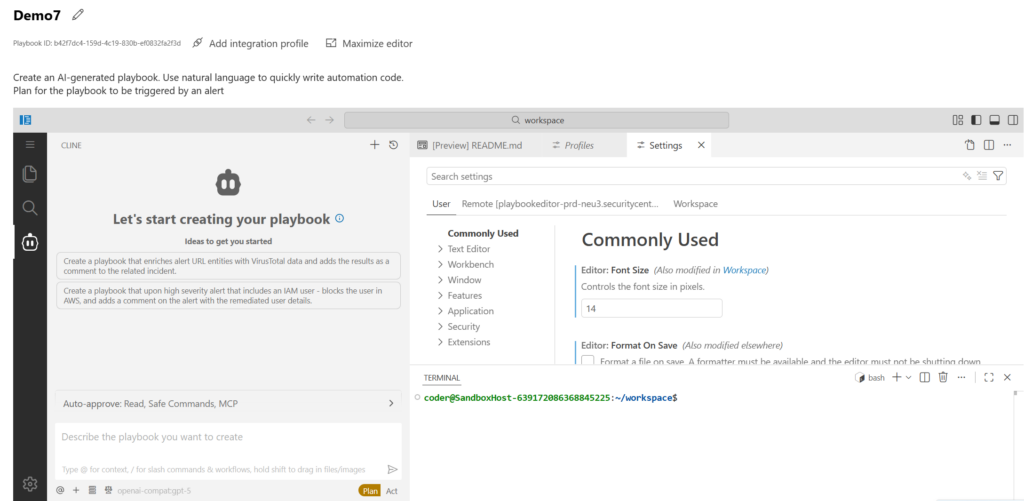
For those unfamiliar with Cline, it is an open-source AI coding agent that helps coordinate the development process. Rather than acting solely as a code generator, Cline is responsible for planning tasks, managing files, interacting with tools, and orchestrating multi-step development activities. In this implementation, Security Copilot appears to provide the reasoning capabilities while Cline serves as the agent framework that helps turn those decisions into a working solution.
The experience begins by loading what Microsoft refers to as a code server. Startup times varied during my testing. Once loaded, you are presented with what is effectively a cloud-hosted VS Code environment embedded directly inside the Defender portal.
The environment includes a project structure, a standard Playbook.py file, agent controls, settings, documentation, and even terminal access.
While the interface resembles VS Code, the development experience is fundamentally AI-assisted and prompt-driven. The VS Code presentation is an interesting choice. Microsoft could have just as easily created a simplified experience consisting of prompts and workflow diagrams. Instead, they chose an environment that feels much closer to a traditional development platform.
To be clear, the generator is not creating Logic Apps. It uses Security Copilot and Cline to generate a new type of Python-based, code-first playbook.
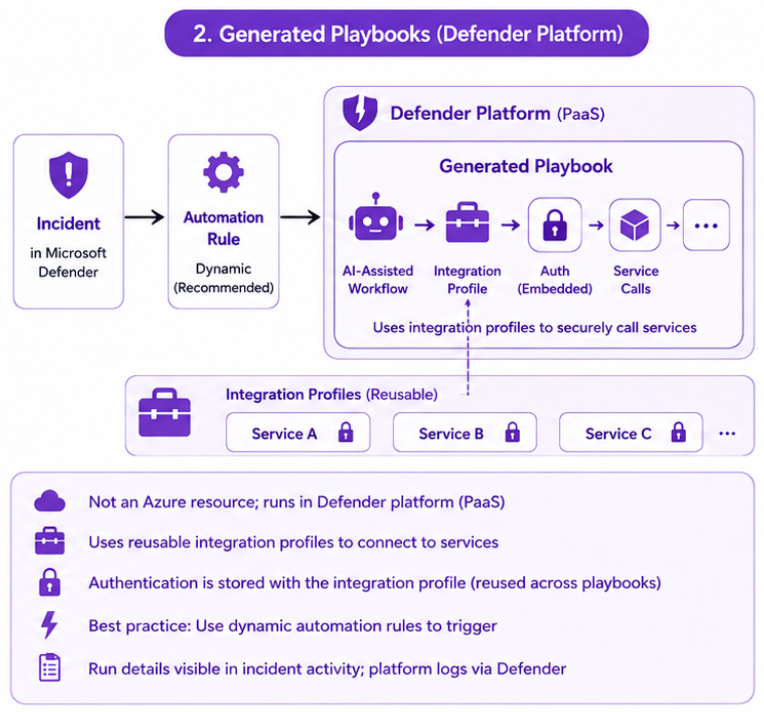
At the time of writing, I have not found a way to upload an existing Python project, import a GitHub repository, deploy a playbook through infrastructure-as-code, or create one outside of the Security Copilot workflow.
Personally, I think there is room for Microsoft to expand this model. Being able to create your own code-first playbooks, manage them as code, share them through GitHub, or even generate them using your preferred coding assistant would make the platform considerably more flexible. Today, the experience appears centered around Security Copilot and Cline.
The underlying runtime remains somewhat unclear. I was unable to identify a corresponding Logic App, Function App, Container App, or other Azure resource being created. What is documented is that these playbooks are Python-based, tenant-scoped, and subject to platform limits such as execution time and playbook count restrictions.
While exploring the generator, I also encountered another new concept that helps explain how these playbooks interact with external systems: Integration Profiles.
Integration Profiles
Another new concept: Integration Profiles, referred to in parts of the documentation as Automated Integrations.
Logic Apps use connectors that define both connectivity and actions. One thing that complicates Logic App development and deployment is that each connector needs its own authentication. Meaning that each Logic App often needs identities, keys, or other credentials configured independently.
Integration Profiles focus on reusable connectivity. You provide a name, description, authentication details, and, for custom integrations, a base API URL. The profile can then be referenced by generated playbooks when interacting with external systems.
Microsoft currently provides roughly 80 predefined integrations covering security products, threat intelligence providers, cloud platforms, and ITSM solutions. The list is much smaller than the Logic App connector ecosystem, but it is also far more security-focused, with fewer unrelated connectors.
The easiest way I can describe them is that they feel less like connectors and more like reusable connection profiles, similar to tools available to an AI agent. They are reusable and contain the authentication mechanism.
At the time of writing, Integration Profiles appear to be designed specifically for the generated playbook experience. I have not found a way to consume them from traditional Logic Apps or other automation platforms, though they would greatly simplify Logic App deployment if that capability existed.
My assumption is that this limitation is intentional. Because these profiles contain reusable authentication information, restricting them to generated playbooks may provide an additional control layer around how those credentials are accessed and used. That said, management and governance of these profiles appears to be an area that still has room to mature as the platform evolves.
Governance and Operations
One area where Logic Apps still have a significant advantage is governance and operational visibility.
A traditional Sentinel playbook is an Azure resource. It lives in a resource group, inherits Azure RBAC, records changes through the Azure Activity Log, and provides detailed execution history through Logic App run logs and Azure Monitor.
Generated playbooks follow a different model. They appear to be Defender-native objects rather than Azure resources. Execution results can be viewed from the Activity tab of the associated incident, but it is not clear if they are written to a common table. Beyond that, the governance story is less obvious. I was unable to find documentation describing playbook-level permissions, execution auditing, change history, versioning, or an equivalent to the Logic App run-history experience.
That doesn’t mean those controls don’t exist. It simply means the operational model for generated playbooks is currently much less visible than the mature Azure governance model that Logic Apps inherit by default.
As organizations begin deploying these playbooks in production environments, questions around who created a playbook, who modified it, what changed, where failures are logged, and how execution history is retained and monitored will likely become increasingly important considerations. Today, those answers are straightforward for Logic Apps. For generated playbooks, they are less obvious.
Recommendations Automation Migrations
The good news is that most existing Sentinel automation rules and playbooks continue to function after migrating to the unified Defender experience. The underlying Sentinel automation framework still exists, and many automation scenarios continue to rely on incidents being synchronized between Defender and Sentinel behind the scenes.
That said, there is one area worth reviewing carefully: automation rules and playbooks that rely on incident titles.
As discussed in my previous article on Defender incident correlation, the Defender correlation engine can rename incidents as alerts are added, removed, merged, or correlated over time. An automation that expects an exact incident title may become less reliable because the title can change throughout the life of the investigation.
If title-based matching is required, consider using keywords rather than exact incident names. Even then, more structured criteria are generally preferred whenever possible.
Migration is also a good opportunity to evaluate whether existing Logic App automations are still the best fit for the workflow. Traditional automation rules and Logic Apps remain fully supported, but organizations may find that some enrichment, classification, or triage workflows are better suited for the new Dynamic Automation Rules and Generated Playbooks available in the Defender portal.
For most organizations, the answer is unlikely to be a complete migration from one model to the other. Instead, this is an opportunity to review existing automations, remove dependencies on unstable incident titles, and determine where the new generated playbook capabilities may provide additional value.
Final Thoughts
I started this investigation trying to answer a simple question about managing automation rules across multiple Sentinel workspaces.
What I found instead was a collection of new capabilities that suggest Microsoft is exploring a very different approach to security automation.
The introduction of AI-generated playbooks is one of the most interesting automation features Microsoft has introduced in years. The ability to describe a workflow in natural language, generate working Python code, and visualize that workflow through a graphical designer significantly lowers the barrier to building custom automations.
At the same time, this is clearly not just a new way to create Logic Apps.
Generated Playbooks use a different execution model, integration model, development experience, and automation framework. In some areas, the experience feels surprisingly mature. In others, it still feels early. Questions around governance, troubleshooting, versioning, portability, operational visibility, and monitoring are much easier to answer in the Logic App world than they are today with Generated Playbooks.
I also came away with a few architectural questions. The decision to center Generated Playbooks around alert-triggered Enhanced Automation Rules was one of the more surprising discoveries during this research. Sentinel spent years evolving toward incident-centric operations, yet Microsoft’s newest automation platform appears focused on alerts rather than incidents. There may be sound reasons for that decision, but it is an area I plan to continue exploring.
Ultimately, I don’t think the story here is about Logic Apps versus Generated Playbooks. The story is that Microsoft appears to be laying the foundation for a more code-first, AI-assisted automation platform. Whether that platform eventually expands to support broader development models, source control workflows, Azure Functions, AI agents, or customer-selected AI models remains to be seen.
For now, I see Generated Playbooks as a promising addition to the Defender portal. I also see a platform that is still evolving, with opportunities to mature before it becomes a complete replacement for the automation ecosystem Sentinel customers have relied on for years.