I am excited to announce the public release of KQL Event Viewer. This is easily the most complete and useful project I have built to date.
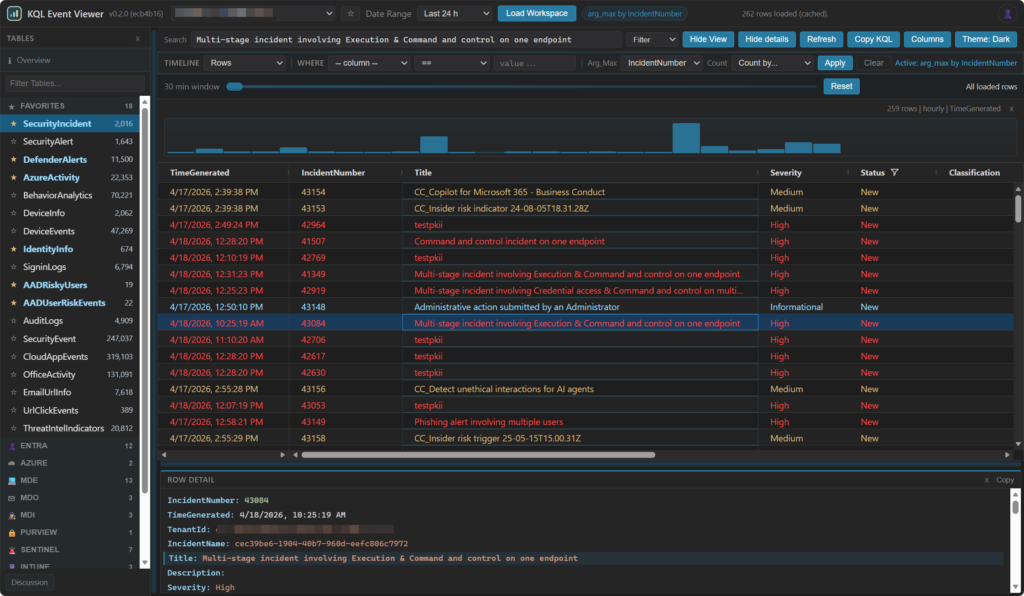
KQL Event Viewer is a Windows Event Viewer-style experience for KQL data. Instead of starting with a query, you start with the data. Tables are organized, pre-filtered, and easy to explore. Filtering, searching, and navigation are built into the interface so you can investigate logs without immediately writing KQL.
The project is being released as both a desktop application and a VS Code extension, depending on how you prefer to work.
Please try it out and share feedback or feature requests in the repository discussion board.
KQL Event Viewer Usage
Background
I love KQL. I would even go so far as to say I am a bit of a KQL expert. I have taught a lot of students how to use it, written training on it, and I work with it almost every day. At times, I feel like I almost think in KQL.
At the same time, KQL is one of the worst parts of working with Microsoft Sentinel, Azure Monitor, Defender XDR advanced hunting, Azure Resource Graph, and Azure Data Explorer.
That probably sounds contradictory, but it really is not.
KQL has a lot going for it. It is fairly easy to learn, even if it is hard to master. It is used consistently across several Microsoft services. It has similarities to Python, PowerShell, SQL, and even SPL, which helps make it approachable. It has a deep set of functions, solid tooling, and LLMs now make query creation easier than ever. KQL is foundational. It powers alert rules, dashboards, workbooks, automation, and hunting. For advanced users, it is not going anywhere.
Still, none of that changes a simple truth.
Who actually wants to use a query language?
Even as someone comfortable with KQL, I still hesitate when I need to write a new query. It is a barrier for people who need these tools but do not have the time or interest to learn it deeply. It creates friction at both the entry level and the expert level. I have always been interested in reducing that friction.
That idea often comes up when I teach KQL.
One of the easiest ways to explain KQL is by comparing it to Windows Event Viewer. Anyone who has done Windows support knows the tool. It presents large volumes of data in a structured, usable way. Logs are grouped, important signals are easy to find, and filtering is built into the experience. It is designed for investigation, not query writing.
Cloud log data behaves in a similar way. It is table-based, immutable, time-driven, and too large to browse without filtering. There are many tables, but only a subset matters most of the time.
The difference is that Event Viewer hides the complexity.
Behind the scenes, Event Viewer relies on local event files and XPath queries. Very few people know XPath well, and almost nobody wants to. Instead of exposing that complexity, the interface abstracts it away. Users get a simple, effective way to explore data without needing to understand the query language underneath.
So the idea is simple: build Event Viewer for KQL.
For years, this was just a concept I talked about. With the rise of vibe coding, it became something I could actually build. Instead of arguing for the idea, I could demonstrate it.
That is where KQL Event Viewer comes in.
The goal is to replace KQL for casual and frequent lookups. Much like XPath in Event Viewer, the underlying query language still exists, but most users should not need to interact with it directly. Advanced users can still use KQL for deeper analysis, tuning, and development.
How the experience works
The application starts with a workspace setup screen to simplify sign-in and avoid manual configuration. You can store multiple profiles, switch tenants, and pull available workspaces. Favorites make it easy to return to commonly used environments.
Once connected, the app retrieves tables and record counts based on a selected time range. Instead of presenting everything equally, it starts with a curated set of commonly used tables.
Tables load progressively. A small dataset appears quickly, followed by additional records loading in the background. You can move between tables while they load, effectively staging multiple datasets at once.
You cannot scroll your way through millions of records. The design assumes filtering is required. Instead of forcing query creation, it makes filtering easy to apply and re-run.
Tables are grouped into categories to improve navigation. Less useful tables stay out of the way but remain accessible. Loaded tables are cached for quick reuse during the session.
Search and filtering are central. You can filter by keyword, highlight matches, explore timelines, and apply common patterns like most recent record or simple counts.
Column handling is preconfigured to reduce noise. You can adjust everything, and your preferences persist across sessions.
Navigation is fast and keyboard-friendly. Records can be browsed quickly with a detailed view below, similar to Event Viewer. Some tables include simple visual cues for things like success or failure.
There are also practical features that make a difference. You can copy the underlying KQL, adjust data volume, collapse UI elements, and verify your current identity and tenant.
From a deployment perspective, this is being released as both a desktop application and a VS Code extension.
A note on vibe coding
This was a more intense vibe coding project than anything I have done before. The complexity exceeded my traditional programming ability, but it was not AI-generated in the typical sense. It was a collaboration.
I acted as the customer. I brought the ideas, direction, and constant feedback. Over roughly 80 hours and hundreds of prompts, I iterated through design, testing, and refinement.
What made this efficient was a clear vision and prior experience. Much of the thinking had already been done before development started.
The result is a more complete initial release. Many ideas that would normally take multiple iterations were explored up front. A traditional approach would likely have led to an earlier but less complete version.