I recently found myself needing to learn Microsoft Agent 365. Like most new Microsoft services, my first stop was the documentation. After an hour or two of focused reading, combined with some time in a lab environment clicking through the menus, I felt like I had a reasonably good understanding of what the service does and how the various pieces fit together.
I also sat through a few training sessions along the way, although I tend to prefer self-directed learning. One thing I highly recommend when learning any new technology is keeping an LLM open alongside the documentation. As questions come up, you can quickly ask for clarification, alternate explanations, or help connecting concepts together. That’s exactly what I did throughout this process.
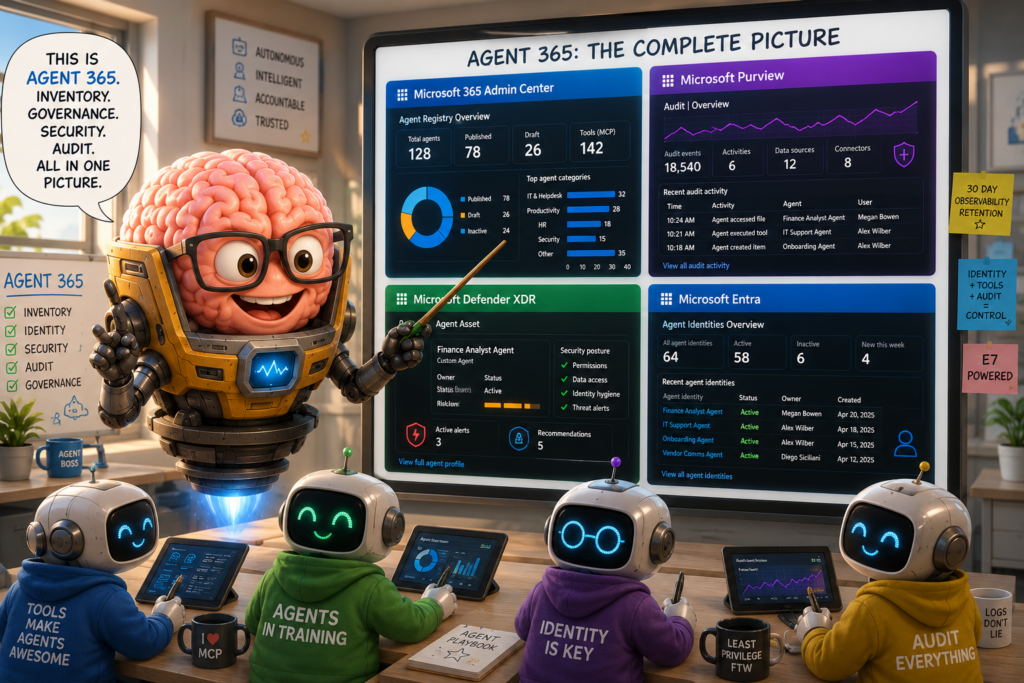
I thought it might be useful to share my initial impressions and provide a quick rundown of what Agent 365 actually is.
First, What Is an Agent?
There are a lot of LLM models available today. A model can accept a prompt and generate a response. Modern models are remarkably capable, but eventually we want them to do more than simply answer questions.
We want them to access private information, search documentation, perform actions, interact with business systems, and operate within organizational controls.
That’s where agents come in.
The term gets used in a lot of different ways, but my favorite mental model is probably MODOK from Marvel: a giant brain inside a robotic body. The brain is the model. The robotic body is the agent.
The model provides reasoning. The agent provides everything else.
An agent is essentially a framework wrapped around a model that gives it access to tools, data sources, memory, permissions, and workflows. Within Microsoft’s ecosystem, agents are often presented as chatbots because that is the easiest way for humans to interact with them. Increasingly, however, agents are becoming autonomous services that can run on schedules, respond to events, collaborate with other agents, and perform work without any human conversation taking place.
What Agent 365 Actually Does
The way I would describe Agent 365 is that it serves as an inventory, governance, auditing, and observability platform for agents.
Organizations already struggle to keep track of users, devices, applications, service principals, automation workflows, and cloud resources. AI agents are rapidly becoming another category of enterprise asset that needs to be managed.
Whether those agents are built in Azure AI Foundry, Copilot Studio, SharePoint, Security Copilot, AWS Bedrock, Google Vertex AI, or another platform entirely, organizations need visibility into what exists, who owns it, what it can access, and what it is doing.
Agent 365 provides that management layer.
Microsoft-native agents are automatically inventoried into what Microsoft calls the Agent Registry. Additional integrations, connectors, SDKs, and Agent Identities can bring external agents into the same inventory and governance model.
Once agents are represented inside Agent 365, organizations gain capabilities such as ownership tracking, lifecycle management, policy enforcement, auditing, security posture management, and observability.
One of the questions I found myself asking was why I would want to inventory agents running in AWS, Google Cloud, or other environments inside Microsoft.
The answer comes down to centralization.
Entra provides a mature identity platform, while Purview provides a centralized auditing platform for AI activity. Rather than collecting logs from multiple providers using different schemas and interfaces, organizations can centralize identity, governance, and auditing into a common platform.
The ability to have a common identity layer and a common audit layer across multiple AI providers has obvious operational and compliance benefits.
It’s also worth noting that most of these capabilities are tied to Microsoft’s E7 licensing strategy, which bundles Agent 365, Work IQ, Agent Identity, Copilot, and Entra Suite capabilities into a single package.
Agent Identity
One of the more significant concepts introduced alongside Agent 365 is Agent Identity.
Historically, applications received an Application Registration and a Service Principal. Agent Identity is Microsoft’s identity type for agents.
One thing worth understanding is that agents don’t inherently need identities. An agent can reason, plan, and make decisions without ever authenticating to anything. The identity becomes important when the agent needs to interact with another system.
Reading SharePoint, accessing Exchange Online, retrieving information from OneDrive, querying Work IQ, calling Microsoft Graph, accessing a database, or invoking an external API all require some form of authentication.
Agent Identity fills that role.
From a developer perspective it behaves somewhat like a Managed Identity because credentials are largely abstracted away. Architecturally, however, it is much closer to a Service Principal because it can be used both inside and outside of Microsoft’s ecosystem.
Agent Identities introduce additional governance opportunities including Conditional Access, sign-in visibility, lifecycle management, permissions management, and security monitoring.
Where the Pieces Show Up
One thing that initially confused me was that Agent 365 doesn’t really live in a single portal.
Instead, its capabilities are spread across several Microsoft services that each provide a different perspective on the same agents.
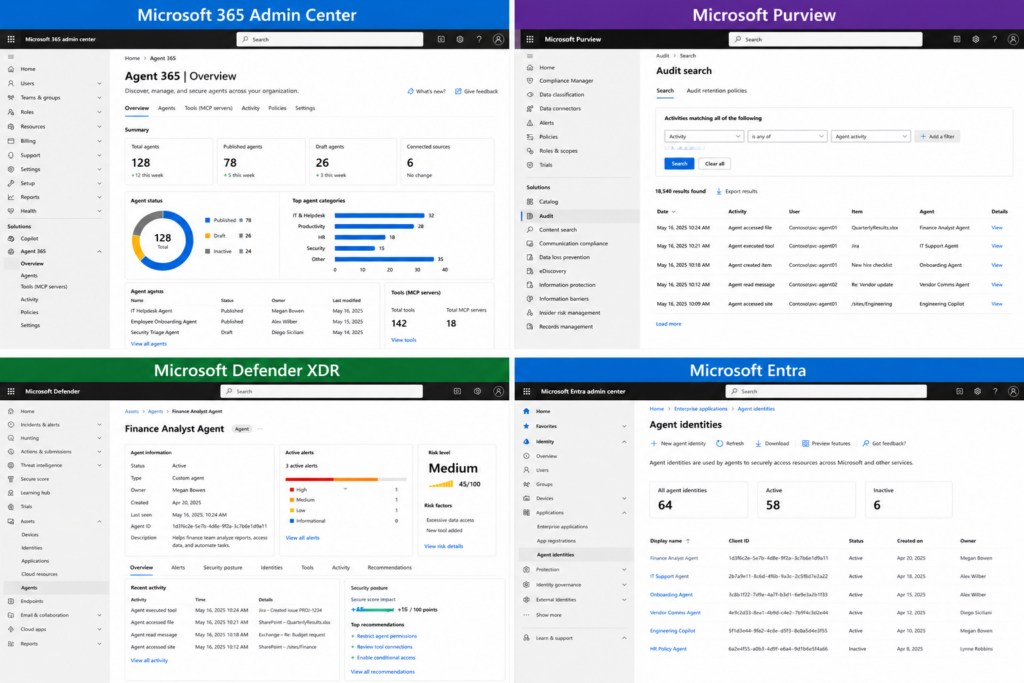
Microsoft 365 Admin Center
The Microsoft 365 Admin Center is where Agent 365 primarily lives and where most administrators will spend their time.
This is where you’ll find the Agent Registry, governance settings, management rules, policy templates, sharing controls, user access controls, observability settings, and the overall inventory of agents known to the platform.
One distinction worth understanding is the difference between the Registry and the Store.
The Registry functions as the inventory and governance plane. It tracks agents, ownership, lifecycle information, governance status, and administrative controls.
The Store is the user-facing distribution mechanism where approved agents can be discovered, installed, assigned, pinned, and consumed.
Agent 365 also isn’t limited to tracking agents. It inventories tools, MCP servers, and agent dependencies. As organizations build more sophisticated agents, the tools an agent can access become just as important as the agent itself. A powerful model with no tools is limited. A modest model with access to SharePoint, Work IQ, ServiceNow, and other business systems can become remarkably capable.
The Microsoft 365 Admin Center also provides dashboards, reporting, observability data, policy management, agent ownership information, and lifecycle controls. If you’re trying to understand Agent 365 itself, this is the first portal I would explore.
Entra
Entra provides the identity layer.
This is where you’ll find Agent Identities, Agent Blueprints, permissions, sign-in activity, governance controls, and Conditional Access integration.
It’s important to understand that this inventory is specifically focused on agents using Agent Identity. It is not necessarily a complete inventory of every agent known to Agent 365.
The key concept here is that Agent Identity is fundamentally about resource access. Agents don’t need identities to reason. They need identities when they need to access something.
In many ways this mirrors the evolution of application identities. We started with service accounts, moved to service principals, adopted managed identities, and now Microsoft has introduced a dedicated identity type designed specifically for agents.
As organizations deploy more autonomous agents, a dedicated identity model becomes necessary for governance, auditing, access control, and security monitoring.
It’s also worth noting that Agent Identity is only one option. Agents may still operate using traditional service principals, managed identities, delegated user permissions, or OAuth-based on-behalf-of flows where the agent acts using the user’s permissions rather than its own.
Defender XDR
Defender XDR treats agents as first-class security assets.
Agents now appear alongside users, devices, applications, and cloud resources. Each agent receives its own profile page, security history, posture information, associated identities, and investigation context.
From an investigation perspective this is particularly useful because agents can now become first-class entities within incidents and investigations.
If an investigation touches an agent, analysts can quickly pivot into the agent profile and review the relevant security context, ownership information, associated identities, alerts, and posture recommendations.
Defender also includes a new AgentInfo table within Advanced Hunting that serves a role similar to DeviceInfo for endpoints.
Purview
Purview is Microsoft’s centralized auditing and compliance platform for AI activity.
Agent activity, tool usage, access operations, governance events, and resource interactions are collected and searchable through Purview.
Purview is also expanding beyond Microsoft-native services. Data connectors now exist for services such as OpenAI Enterprise and Claude Enterprise, allowing organizations to centralize AI-related auditing across multiple providers.
One thing that stood out to me is that prompt and response logging is not the primary focus of the current auditing model. The emphasis is much more focused on actions, access activity, tool usage, governance events, and resource interactions.
One limitation worth noting is that Agent 365 observability data is currently retained for only 30 days. Organizations with longer compliance or regulatory requirements will likely need to evaluate how Purview, Sentinel, or other archival solutions fit into their long-term retention strategy.
Shadow AI
Another capability worth mentioning is Shadow AI discovery.
Using Defender for Endpoint and Intune-managed devices, organizations can discover locally installed AI tools and agent frameworks such as Claude Code, Cursor, Windsurf, GitHub Copilot CLI, Claude Desktop, and ChatGPT Desktop.
Today this capability is focused primarily on managed endpoints rather than broad AI discovery across every environment. The feature feels very similar to traditional Shadow IT discovery, except the focus has shifted from unauthorized applications to unauthorized AI tools and local agent frameworks.
Final Thoughts
Agent 365 is surprisingly straightforward once you understand the role it plays.
At a high level:
- Agent 365 inventories and governs agents.
- Entra manages agent identities.
- Defender XDR treats agents as security entities.
- Purview serves as the centralized auditing platform.
The actual agents may run in Foundry, Copilot Studio, SharePoint, AWS, Google Cloud, or somewhere else entirely. Agent 365’s job is to keep track of them, govern them, monitor them, and help organizations understand what agents exist, who owns them, what they can access, and what they’re doing.
Hopefully this saves you a few hours of research and gives you a practical mental model for understanding where Agent 365 fits into Microsoft’s rapidly expanding AI ecosystem.