This is a topic I find myself explaining regularly, especially when customers are migrating to the unified Defender experience and trying to understand how existing automation, ITSM integrations, and incident workflows will be affected. It’s one of my longer articles, but understanding alerts, incidents, and correlation is an important part of understanding how Microsoft Sentinel and Defender work today.
Part of the confusion comes from history.
For years, Sentinel and Defender evolved independently. Both had their own incident management systems, APIs, automation capabilities, identifiers, workflows, and investigation experiences.
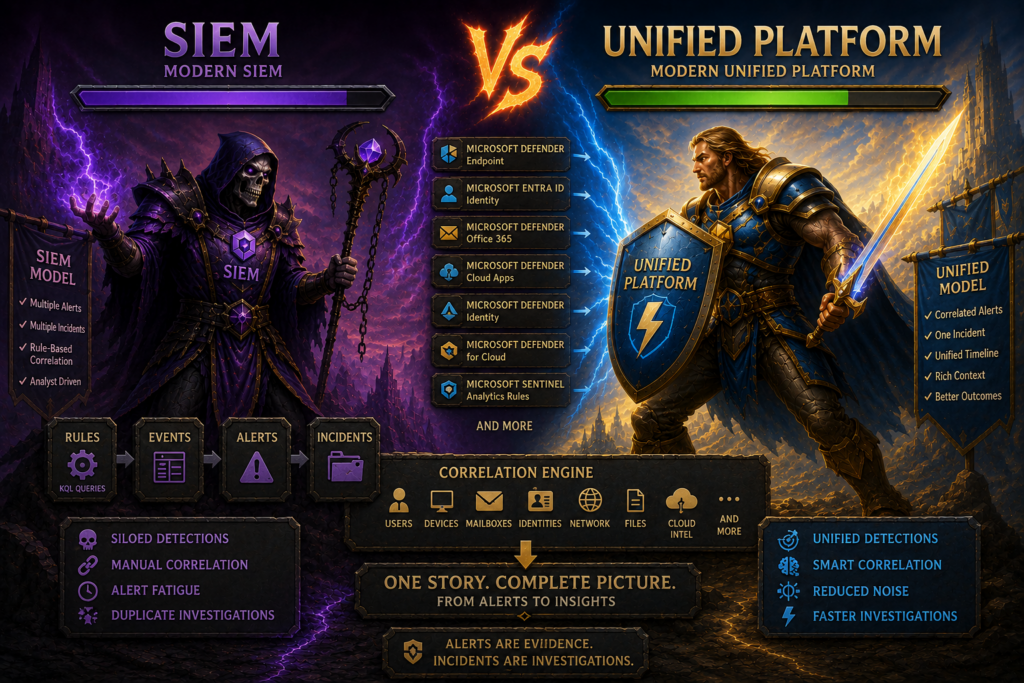
Today these platforms are converging into a unified experience. Much of the original plumbing still exists for backward compatibility, which explains many of the integration and automation challenges customers encounter.
Alerts, Incidents, and Cases
A simple way to think about this is:
- Alerts are evidence
- Incidents are investigations
- Cases are collections of related investigations
Using a police analogy:
- Fingerprints and photographs are evidence (alerts)
- Similar evidence like fingerprints of the same person (events)
- The case file is the investigation (incidents)
- Multiple related investigations may belong to a larger case (case)
How Sentinel Originally Worked
For many years, the Sentinel portal in Azure was Microsoft’s primary SOC platform.
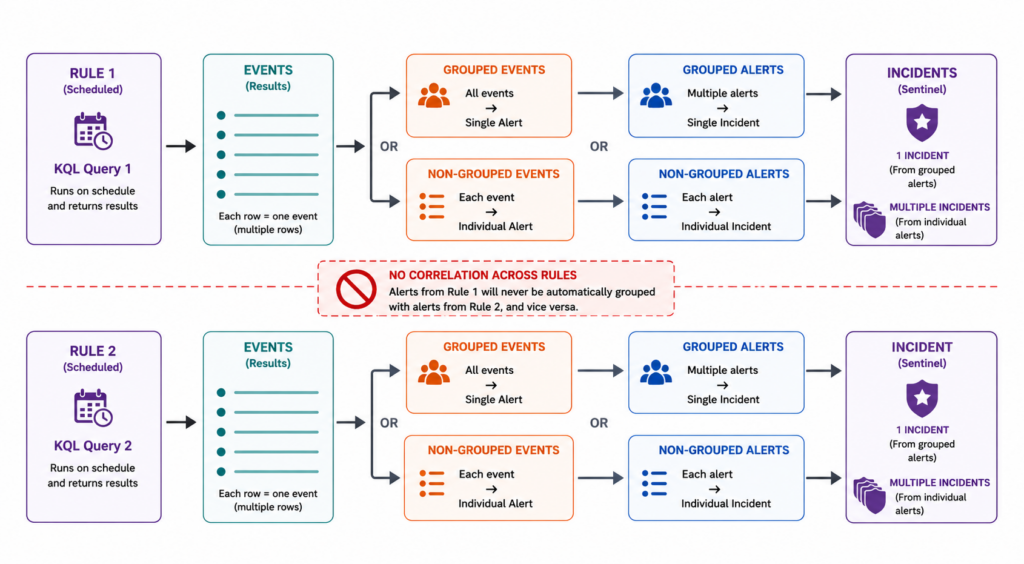
Sentinel detections are built using Analytics Rules. These rules execute KQL queries on a schedule and return one or more rows of data. Each row is an event.
The workflow looks like this:
**Rule **→ Query → Events → Alerts → Incidents
By default, all events returned during a rule execution are grouped into a single alert.
Administrators can disable event grouping, allowing individual events to generate separate alerts. This is useful when each event represents a separate investigation, such as multiple compromised devices.
A well-designed analytics rule returns one row per detection, minimizing the need for event-grouping decisions.
Originally, Sentinel performed incident creation itself. After alerts are generated, Sentinel creates incidents. New alerts were evaluated and added to prior incidents or a new incident was created if no correlation found.
Sentinel could group alerts into incidents, but only within a single rule. Alerts generated by different rules could not be automatically combined into the same incident.
To make matters more interesting, alert grouping is disabled by default and remains disabled in most rule templates.
As a result, many Sentinel environments operate with a simple relationship:
- One alert
- One incident
This made Sentinel easy to understand and easy to automate, but it also limited correlation and frequently resulted in multiple analysts investigating different pieces of the same attack.
First-Party Microsoft Detections
Microsoft security products already contain extensive built-in detection logic.
Examples include:
- Defender for Endpoint
- Defender for Identity
- Defender for Office 365
- Defender for Cloud Apps
- Entra ID Protection
- Defender for Cloud
These products generate alerts independently.
One of the most common mistakes in Sentinel deployments is recreating detections that already exist.
The result is:
- Duplicate alerts
- Duplicate incidents
- Additional noise
- Analyst fatigue
Most organizations are better served by trusting Microsoft’s built-in detections and using Sentinel analytics rules for non-Microsoft data sources, organization-specific requirements, and detection gaps.
As a consultant, I often find that the complaint of “too many incidents” is self-inflicted through duplicate detections and unnecessary analytics rules.
The Evolution of Defender
While Sentinel was evolving into Microsoft’s SIEM and SOAR platform, Microsoft was building a separate security operations platform around its first-party security products.
Over time products such as MDE, MDI, MDO, and MDCA were consolidated into a common portal experience with shared investigation workflows.
Additional services including Entra ID Protection, Purview, Defender for Cloud, and Sentinel later integrated portions of their alerting and investigation experiences as well.
Today analysts can manage incidents across most of Microsoft’s security stack from a single portal.
As Defender matured, it developed many of the same capabilities Sentinel already offered:
- Alert management
- Incident management
- Investigation workflows
- Automation
- Advanced Hunting (KQL query tool)
- APIs
The result was two Microsoft security platforms solving many of the same problems.
Defender’s Data Model
To understand incident correlation, it is important to understand that Sentinel and Defender use different data platforms.
Sentinel is built around Log Analytics.
Defender uses its own managed datastore.
Both support KQL, but they are querying different data sources.
Defender exposes its data through Advanced Hunting, which provides access to up to 30 days of telemetry. The Defender portal itself provides visibility into approximately 180 days of historical data.
Traditionally, many organizations also sent Defender data into Sentinel for longer retention, custom detections, and reporting.
The important point is simple:
Defender has its data and Sentinel has its data.
How Incident Correlation Works Today
The biggest change introduced by the unified Defender experience is that Sentinel no longer creates incidents.
Sentinel Analytics Rules still create alerts.
Defender products still create alerts.
Custom Defender detections also create alerts.
Those alerts flow into a common alert pipeline, and Defender’s correlation engine creates incidents.
Unlike Sentinel’s original model, correlation is not limited to a single rule.
Defender evaluates relationships between users, devices, identities, mailboxes, IP addresses, domains, file hashes, cloud resources, attack timelines, and other evidence associated with an investigation.
Many of these relationships are established through entity mapping.
Entities are IPs, domain names, URLs, identities, email addresses, file names, fine hashes, etc. They are key indicators used for correlation.
If multiple alerts contain related entities, Defender can associate them with the same investigation and build a broader attack story.
A phishing email detected by MDO may be correlated with credential theft detected by MDI and malware execution detected by MDE.
Instead of three separate incidents, analysts receive a single investigation containing evidence from all three products.
This is the real value of correlation.
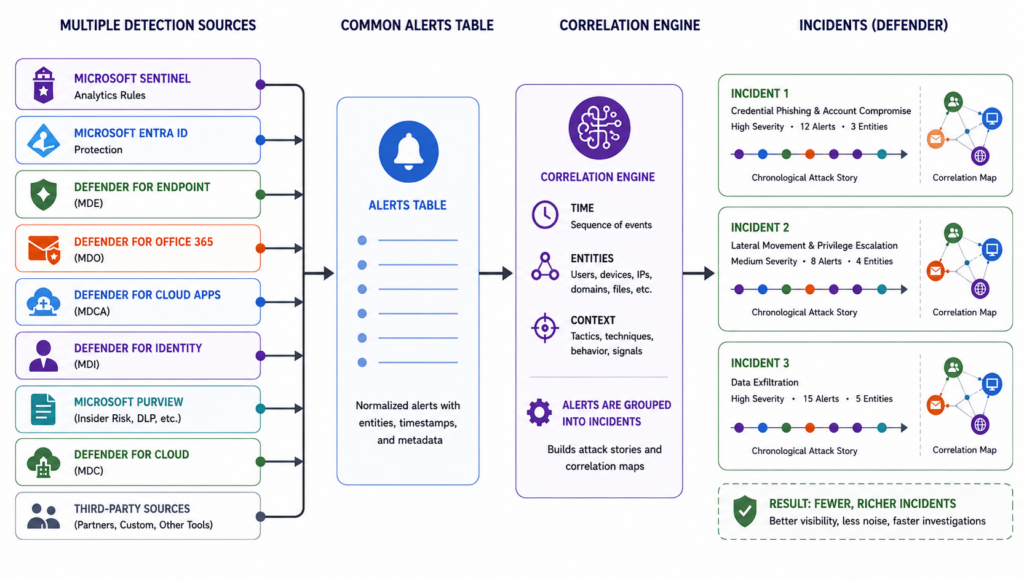
The resulting incident presents alerts in chronological order and creates a much more complete investigative narrative.
Poor entity mapping breaks correlation. When alerts lack meaningful entities, the system begins to look much more like the original Sentinel model:
- One alert
- One incident
- Limited correlation
Correlation can be disabled when necessary, for all Sentinel rules or for specific Sentinel rules, to maintain compatibility with legacy automation.
However, this should generally be viewed as a temporary solution. Correlation does far more than reduce incident volume. It creates richer investigations and more complete attack stories. As organizations increasingly adopt AI-assisted investigations and agentic workflows, the value of that additional context becomes even more important.
Incident Lifecycle and Automation Considerations
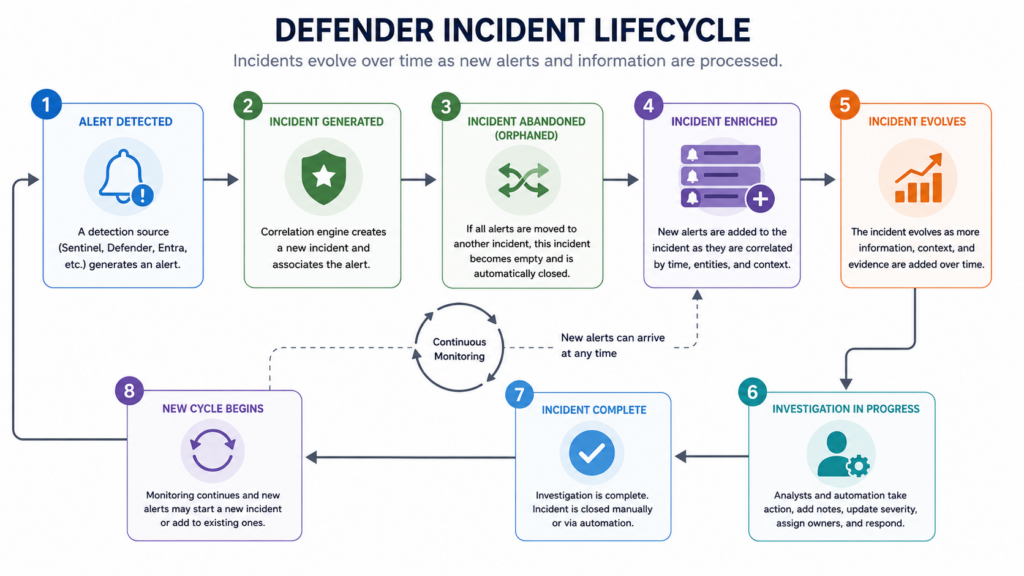
One of the most important differences between traditional Sentinel incidents and modern Defender incidents is that Defender incidents evolve over time.
A newly created incident is rarely a fully matured investigation.
As additional alerts arrive, Defender may add evidence, add entities, increase severity, rename incidents, or merge related activity into an existing investigation.
An incident retrieved one minute after creation may look very different thirty minutes later.
This is one of the reasons legacy one-way integrations frequently struggle with Defender incidents.
Many older workflows assumed incidents were static. An incident would be created, copied into an ITSM platform, and never revisited.
Modern Defender incidents do not behave that way.
Incidents Must Be Closed
Defender assumes incidents will eventually be investigated and closed.
Open incidents continue accumulating related evidence.
In large environments, incidents left open for extended periods can become extremely large and difficult to manage.
Organizations that forward incidents into external ITSM platforms without maintaining closure processes frequently encounter this problem.
At minimum, organizations should implement:
- Incident closure processes
- Two-way synchronization with ITSM platforms
- Periodic review of stale incidents
Why Incidents Sometimes Change or Disappear
Another behavior that surprises automation developers is that incidents occasionally appear to be renamed, merged, canceled, or replaced.
When an alert first arrives, Defender may quickly create an incident so that it can be surfaced to analysts and automation workflows.
As additional evidence arrives, the correlation engine may determine that the alert belongs to a different investigation, that multiple incidents should be merged, or that a better incident name should be applied.
The result is that incidents sometimes appear to change unexpectedly as the investigation matures.
This behavior is normal and should be expected when designing automation.
Recommendations for Automation Developers
Modern integrations should be built around incidents rather than alerts.
Alerts are evidence.
Incidents are investigations.
For existing integrations, the Sentinel SecurityIncident and SecurityAlert tables (and related API) remain viable and should continue functioning for the foreseeable future.
For new development, I recommend using Defender incident APIs whenever possible.
Modern integrations should:
- Detect newly created incidents
- Track incidents throughout their lifecycle
- Revisit incidents periodically
- Process updates and changes
- Synchronize updates and closure activities
One-way integrations that simply copy incidents into another system and never revisit them are increasingly difficult to justify.
Closing Thoughts
The transition from Sentinel-centric incident management to Defender-centric incident correlation introduced additional complexity, but it also introduced significantly better investigations.
Understanding how alerts become incidents, how correlation works, and how incidents evolve over time is essential for anyone building automation, integrations, reporting solutions, or AI-assisted workflows on top of Microsoft’s security platform.
The technology will continue to evolve, but the core concepts remain the same:
Alerts are evidence.
Incidents are investigations.
Good correlation is what turns isolated evidence into an attack story.