I recently worked with a customer who had done the right thing from a security perspective. They followed the best practice of separating standard user accounts from privileged admin accounts. Day-to-day work was done with a normal account, and elevated tasks required a separate admin identity.
What they chose not to do was record the associated user contact in the admin account properties.
At first, this did not seem like a major issue. But as the tenant grew and the number of admin accounts increased, it became difficult to answer a simple operational question: who do we contact when we need to reach the owner of this admin account?
There are real use cases where that linkage matters. Automated notifications, access reviews, incident response outreach, and governance workflows can all rely on pulling a contact email from account properties. Without that mapping, teams are left guessing or manually investigating.
This workbook was created to help solve that specific problem.
Introducing the Entra Admin Review Workbook
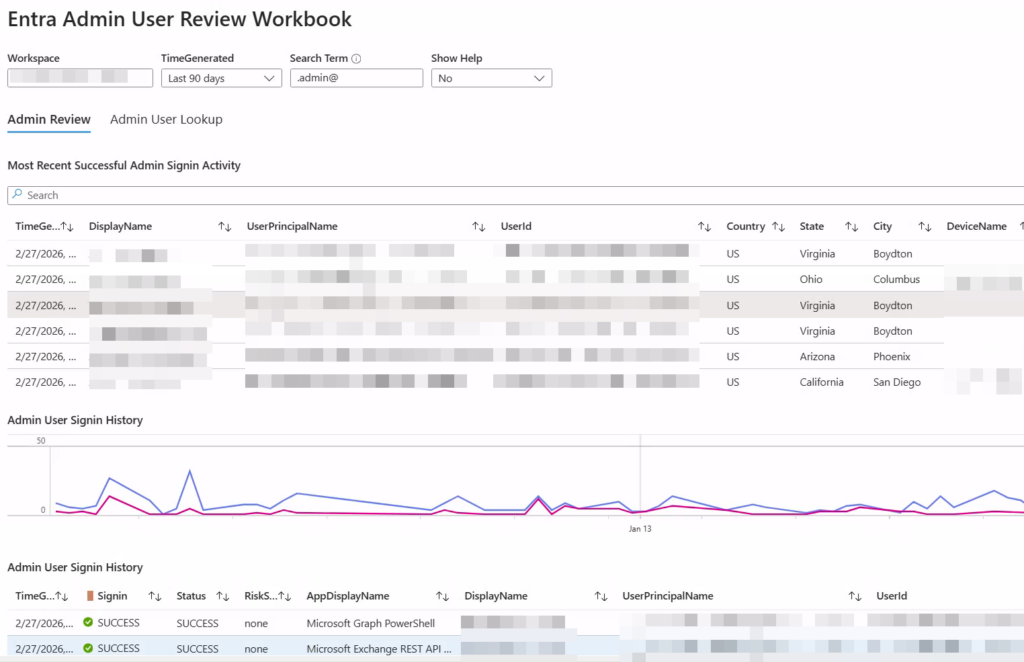
The Entra Admin Review Workbook is an Azure Monitor Workbook designed to help identify likely user contacts for admin accounts that do not have that information recorded.
It enables you to:
- Identify accounts containing “admin” or “adm” in the name
- Attempt to correlate likely standard user accounts based on naming patterns
- Export a downloadable spreadsheet for manual or automated cleanup
- Review related signals such as logon history, PIM activity, and admin actions
The original goal was narrow and practical: help teams restore traceability between admin and user accounts. The additional insights, such as PIM timing and activity history, ended up being a useful bonus.
Why This Matters
In many environments, admin accounts are created correctly but governance metadata is incomplete. As inventories grow, so does the friction:
- Admin accounts exist with no clear documented owner
- Contact workflows break because no email is tied to the account
- Cleanup efforts require manual research
- Audits become more painful than they need to be
By surfacing probable 1:1 matches between admin and user accounts and providing an exportable dataset, this workbook supports both immediate remediation and longer-term process improvements.
It does not enforce policy. It does not modify accounts. It provides visibility and structure so that cleanup and automation can be done with confidence.
Getting Started
You can download and deploy the workbook directly from the GitHub repository:
Repository:
AndrewBlumhardt/EntraAdminReviewWorkbook
Import the workbook into Azure Monitor using the instructions in the README, connect it to your tenant, and begin reviewing your admin account inventory.
If you are operating in an environment where admin separation is in place but documentation is inconsistent, this may help you close that gap quickly and cleanly.