I have been working with Microsoft Sentinel since before it reached general availability in September 2019, supporting customers, delivering training, and developing real-world deployment guidance. Over that time, I have worked with dozens of organizations across both commercial and government environments, ranging from small universities to large global enterprises.
I share that context only to establish credibility for the app I am about to introduce. While there may be some untested outliers in the app itself, this is a manifestation of many years of experience.
Why This App Exists
Estimating Sentinel cost is not easy. There are a lot of moving parts, and it is very easy to get stuck overanalyzing smaller details that do not materially impact the outcome.
I was recently looking at another cost estimator and had the thought that in the age of vibe coding, if you think you can do better, you probably can. So I built one.
Here is the GitHub Repo or Open the Demo
This project, including documentation and testing, took about 6 to 8 hours for an initial release. It is a single HTML file that can be easily shared or hosted anywhere. The goal was not to build something perfect, but something practical that reflects how environments actually behave and how decisions are really made.
There are two goals here. First, simplify the process of estimating cost before deployment or when planning changes. Second, help avoid analysis paralysis by focusing attention on the inputs that actually matter.
Starting Point: Company Profile and Recommendations
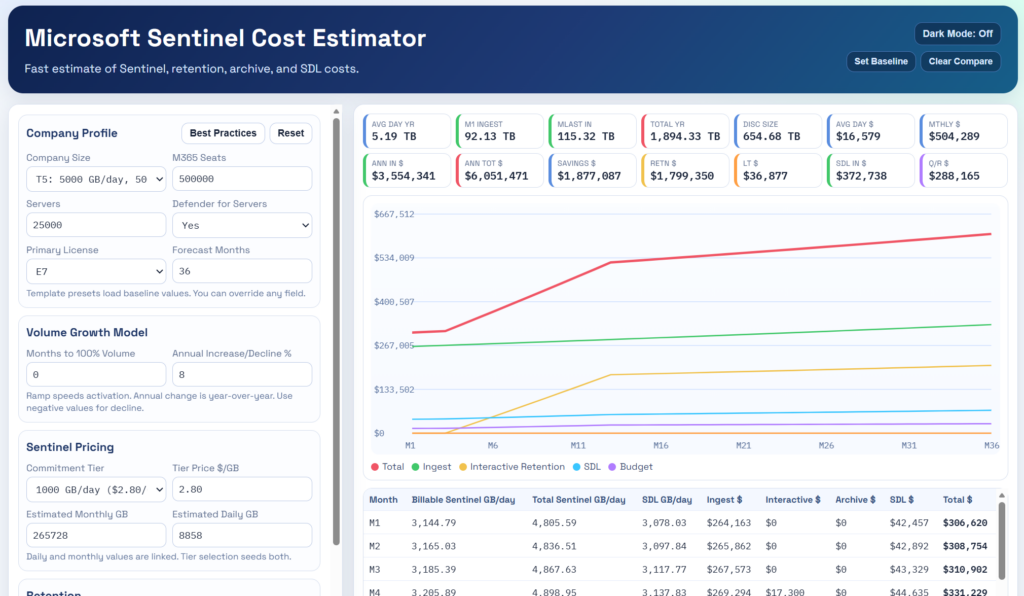
At the top left is the Company Profile. You can select different company tiers to prepopulate the app with sample inputs. These are just starting points. You can replace inputs with real values or your own estimates at any time.
I also added a Recommendation button where I describe what I would expect in an ideal deployment.
That recommendation assumes E5 or E7 licensed users. This provides the strongest overall feature set and security coverage.
There are two separate cost benefits to understand here:
The E5 offer is automatically applied and grants approximately 5 MB per user per day for ingestion of Entra and XDR-related data into Sentinel. This is not something you configure, it is simply part of the licensing benefit. It often amounts to a sizable discount.
The Defender for Servers benefit provides up to 500 MB per server per day. This is where most of the confusion happens. The discount only applies to specific tables and only one of those tables is significant in size, which is SecurityEvent.
While some servers can exceed 500 MB per day, this is usually the result of misconfiguration. A more realistic average across several servers is closer to 80 MB per server per day. Because the benefit is calculated as a daily average, you are unlikely to see the full 500 MB reflected as a direct reduction in billed ingestion. The practical outcome, however, is that Windows Security Events are often ingested at little to no additional cost (if you have Defender for Servers).
These two benefits operate independently and should be considered separately when estimating cost.
Servers, MDE, and MDI
For servers, you still want Defender for Endpoint and Defender for Identity, especially on domain controllers, from both a security and visibility perspective.
From a cost standpoint, these do not have a significant impact on XDR data volume, so they do not meaningfully change ingestion estimates.
Retention: One of the Best Investments You Can Make
I highly recommend 12 months of interactive retention as a baseline, and 2 full years for key and free tables. Many customers stop at the default 90-days unfortunately.
The cost is relatively low compared to the value. This becomes even more important as you introduce a data lake model where queries are metered. Interactive retention is fast and has no additional query cost. Having the data immediately available is consistently beneficial.
If a data lake option is not yet available in your region, I recommend using Log Analytics archival. It is easy to manage and aligns well with a future transition. There is no direct data migration to data lake, but tooling and billing allow them to operate side by side with minimal friction.
This is generally not the right time to invest in building a new ADX archival solution. If you already have ADX, running it alongside a data lake may make sense, but cost and complexity are often higher than expected when ADX is involved.
A better approach is to use archival until data lake is available, maximize interactive retention, and store data longer than you think you need. You can adjust later if needed, but in most cases it ends up being a small percentage of overall Sentinel spend with strong return.
Pre-Ingestion Filtering: Where You Take Control
Next is pre-ingestion filtering, one of the most effective ways to control ingestion cost.
You want to filter:
- Non-interactive Entra sign-in logs
- SecurityEvent logs, if you are not using Defender for Servers
- Third-party network logs over Syslog or CEF, if they are not being sent to a data lake
Most first-party Microsoft logs are high fidelity. They can be sizable, but they are typically high value.
Filtering is about reducing record size, eliminating duplication, and removing low-value data. This could easily be an article on its own. Filtering can also happen at the source, which is often the most efficient approach.
Data Lake Decisions
Once a data lake option is available, you gain flexibility in how you store and access data.
A subset of tables will make sense to send directly to the data lake, and this can drive meaningful cost savings. The decision should be deliberate and based on usage patterns.
Key considerations include:
- Is the data required for detection
- Is it frequently queried
- Does the value justify full ingestion cost
- Would query-based costs be lower than ingestion savings
Not every table should be sent directly to the data lake. The goal is to identify the right candidates where cost can be reduced without impacting detection or investigation quality.
Modeling Ramp, Growth, and Budget
Beyond recommendations, the app allows you to model a ramp period for new deployments. It may take a few months to reach full ingestion, though ramp can happen faster than expected.
You can also define projected annual growth or decline. Most environments trend upward, but not all.
The app captures:
- Interactive and long-term retention assumptions
- Estimated pricing baselines such as roughly $0.20 per GB for interactive and $0.02 for archive
- Data lake assumptions with compression benefits
- Restore and query budgets as a percentage of total Sentinel cost
Restore operations tend to be less frequent but can be expensive. Data lake query costs are more common and usually require a larger budget, but they are often offset by lower ingestion costs when data is routed appropriately.
Connectors and Tables: Keeping It Practical
The app groups connectors into major categories instead of overwhelming you with individual tables.
For each category, you can define:
- A target for pre-ingestion filtering
- A percentage to send directly to the data lake
These are the controls that have the greatest impact on cost.
A Note on Accuracy
Even with modeling, the most accurate way to estimate cost is still simple. Make sure to input values directly from the pricing page in Sentinel for best results.
The best way to verify cost is to simply turn on a connector for a few days.
Run it for a few days, ideally a full week. This gives you real data to estimate long-term cost, identify filtering opportunities, determine value, and decide how the data should be handled.
One of the advantages of Sentinel is the lack of upfront commitment. Running a connector for a short period is a low-risk way to get validated data.
What This App Is Really Solving
There is a tendency to over-focus on smaller cost areas like Logic Apps, notebooks, or even retention. In practice, these are usually a small portion of overall cost when configured well.
The primary drivers are ingestion volume and how that volume is managed.
This app is designed to keep focus on those areas and help guide decisions that have the most impact.
Closing Thoughts
This estimator is not meant to be perfect. It is meant to be useful.
It reflects years of experience, real-world deployments, and practical cost optimization strategies. It also reflects how quickly useful tools can be built today. As a quick vibe code project there might also be unverified inaccuracies.
In this case, it started with a simple observation. I saw an existing estimator and believed I could build something more practical. A few hours later, that idea became a working tool.
If you think you can do better, you probably can.