Over the last two years, Microsoft’s AI ecosystem has expanded incredibly fast. What initially started as a relatively straightforward launch of Microsoft 365 Copilot has rapidly evolved into a much broader platform involving enterprise grounding, semantic intelligence, multi-model orchestration, AI agents, delegated workflows, governance platforms, and enterprise AI security controls. Along the way, Microsoft has introduced a growing collection of new AI services such as Work IQ, and Cowork, Agent 365 (A365). At the same time, the broader ecosystem now includes Copilot Studio, Teams Builder, Azure AI Foundry, Security Copilot, MCP integrations, and a growing number of AI-driven orchestration capabilities.

For many organizations, it can be difficult to keep track of what all of these services actually do, how they relate to each other, and where Microsoft appears to be heading strategically. Some of these capabilities are already generally available, while others are still in preview or evolving rapidly behind the scenes. In several cases, the products themselves are converging faster than the documentation surrounding them.
The goal of this article is not to provide an exhaustive technical reference, but rather to help establish a practical mental model for understanding the growing Microsoft AI ecosystem. In many ways, the industry is rapidly transitioning from isolated chatbot experiences toward fully orchestrated enterprise AI systems capable of reasoning over private organizational data, coordinating workflows, and eventually acting more like supervised digital workers than traditional assistants.
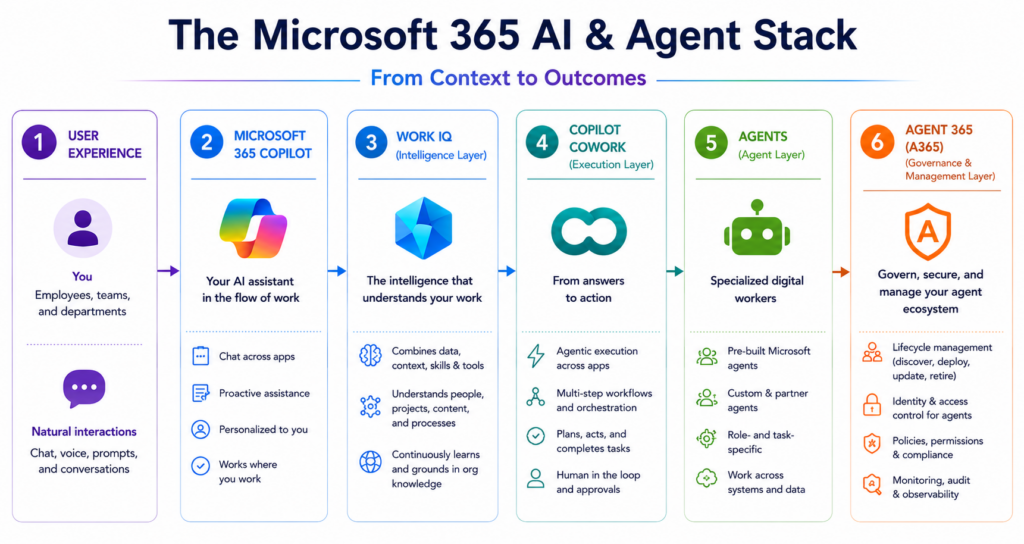
One important note before diving in: while I am a Microsoft employee, this article is not based on insider information, roadmap access, or non-public documentation. Everything discussed here is based on my own research, hands-on testing, public documentation, public announcements, and personal interpretation of where these technologies appear to be heading. In several areas, the products themselves are evolving faster than the documentation, so some of this article naturally includes speculation and architectural interpretation on my part. The goal here is simply to help others get up to speed on a rapidly growing and sometimes confusing set of Microsoft AI capabilities as I continue learning about them myself.
Microsoft 365 Copilot
At its core, Microsoft 365 Copilot is Microsoft’s enterprise AI productivity assistant integrated directly into the Microsoft 365 ecosystem. Unlike public consumer-facing LLM services, Microsoft 365 Copilot focuses heavily on the combination of privacy, governance, and access to private organizational data. Rather than simply generating responses from public internet knowledge, Copilot is grounded on internal organizational context such as emails, Teams chats, SharePoint sites, meeting transcripts, calendars, files, and business content that users already have permission to access.
One of the most important aspects of Microsoft 365 Copilot is that users do not need to share sensitive organizational information into external AI services. The system already understands much of the user’s organizational context because it operates directly within the Microsoft 365 ecosystem using existing enterprise permissions and governance boundaries. In most scenarios, Copilot operates using delegated user permissions, meaning users can generally only access data through Copilot that they could already access through traditional Microsoft 365 applications.
This creates a very different experience than public frontier models. Users who regularly interact with public LLMs often notice that Microsoft 365 Copilot can feel somewhat slower, more constrained, or less aggressive in its responses compared to the latest public models. That tradeoff is intentional. Enterprise AI is less focused on maximizing raw responsiveness and more focused on balancing capability, governance, privacy, safety, and secure access to private organizational information. Microsoft 365 Copilot also operates inside a much larger enterprise control plane involving identity, compliance, DLP, auditing, retention, and security controls.
At the same time, Copilot is far more than a search engine over company documents. One of its most impactful capabilities is helping users create content and reduce repetitive work. Copilot can summarize Teams meetings, review long email threads, generate PowerPoint presentations, assist with spreadsheets, draft responses, create documents, and help users process large amounts of organizational information much more efficiently. For many users, Teams meeting summarization alone has become one of the most transformative productivity capabilities introduced in years.
Microsoft is also no longer treating Copilot as a single-model experience. The newer Microsoft 365 Copilot experiences increasingly expose multiple model options, deeper reasoning modes, orchestration layers, and agent ecosystems. This is an important shift because it reflects how enterprise AI is evolving from a simple chatbot into a broader orchestration platform involving models, tools, workflows, memory, and contextual intelligence.
It is also important to recognize that Microsoft is not alone in this direction. Other providers are increasingly building enterprise-grounded AI ecosystems with similar goals around privacy, governance, and organizational context. However, Microsoft was one of the earliest major vendors to aggressively operationalize enterprise-grounded AI directly inside the productivity suite itself.
Work IQ
If Microsoft 365 Copilot is the assistant users interact with directly, then Work IQ is the intelligence layer helping those AI systems understand how work happens inside an organization. Microsoft describes Work IQ as the grounding and contextual intelligence platform behind Copilot and enterprise agents, but in practical terms, Work IQ helps AI move beyond simply answering questions and begin reasoning over organizational context.
Early Microsoft 365 Copilot experiences were heavily associated with GPT-based reasoning combined with organizational grounding through Microsoft Graph and Microsoft 365 data. Even before Work IQ entered the conversation, those capabilities were already extremely powerful. Users could summarize meetings, draft documents, analyze spreadsheets, generate presentations, and reason over internal organizational information using natural language. Work IQ represents the next stage of that evolution. Rather than simply grounding prompts against enterprise content, Microsoft is increasingly building a broader contextual intelligence layer involving semantic indexing, organizational memory, contextual awareness, skills, tools, APIs, MCP integrations, and emerging agent orchestration concepts.
This distinction matters because enterprise AI is far more complicated than connecting a chatbot to company documents. Modern organizations generate enormous amounts of fragmented information spread across emails, Teams chats, meeting recordings, SharePoint sites, calendars, spreadsheets, ticketing systems, and business applications. Simply retrieving files containing matching keywords is often not enough. AI systems increasingly need to understand relationships between people, projects, meetings, workflows, priorities, and business processes in order to provide useful answers.
That is where Work IQ becomes particularly interesting. Microsoft frequently references concepts such as the semantic index, organizational memory, contextual awareness, business grounding, skills, and enterprise reasoning. Collectively, these capabilities allow AI systems to build a richer understanding of how an organization operates. Rather than simply locating documents, Work IQ helps AI systems understand which information matters, who is involved, what projects are connected, and how work flows between teams and systems.
One of the most important architectural shifts is that Microsoft is no longer keeping this intelligence confined to Office applications. Work IQ capabilities are increasingly being exposed through APIs, MCP servers, skills, tools, and command-line interfaces. This allows developers and AI agents to interact with organizational intelligence directly from environments such as Visual Studio Code, GitHub Copilot, automation pipelines, and custom enterprise applications. Organizational intelligence is no longer limited to a chatbot window inside Teams or Outlook. It is becoming portable and accessible to development environments, coding assistants, automation frameworks, and custom AI solutions.
Another important aspect of Work IQ is that it remains grounded in existing Microsoft identity and permission models. In most scenarios, Work IQ operates using delegated user access, meaning users and agents generally cannot retrieve information they would not already have access to through normal Microsoft 365 permissions. At the same time, Microsoft is increasingly introducing concepts such as agent identities and governed enterprise agents through the broader A365 ecosystem. This points toward a future where AI agents may operate as independently managed enterprise identities with their own permissions, policies, audit trails, and approved tool access rather than only acting on behalf of human users.
Taken together, Work IQ represents a major evolution in enterprise AI architecture. The industry is moving beyond isolated copilots that simply answer questions and toward systems capable of understanding organizational relationships, workflows, priorities, and business context at scale.
Cowork
Microsoft 365 Cowork and the Shift Toward Action-Oriented AI
Microsoft describes Cowork as an action-oriented AI experience inside Microsoft 365 Copilot designed to help users move from conversation to execution. In practice, Cowork gives Copilot users the ability to prompt using the latest Claude models while introducing a framework for reusable lightweight agents called skills inside the Microsoft 365 Copilot experience. Rather than functioning purely as a chatbot or content-generation assistant, Cowork is intended to help users coordinate multi-step tasks such as organizing communications, preparing for meetings, researching topics, arranging schedules, drafting responses, and managing workflows across Microsoft 365 applications. Cowork is a much more goal-oriented experience where users delegate outcomes rather than simply asking isolated questions.
From a user perspective, Cowork currently appears as an agent within the broader Microsoft 365 Copilot catalog. Once selected, users interact through an open-style chat interface using the latest Claude models while gaining access to 13 built-in skills and the ability to create up to 20 personal custom skills. Microsoft also appears to be positioning skills as reusable and shareable workflow components, though the long-term organizational sharing model still appears to be evolving.
A skill is essentially a reusable action-oriented AI capability that combines instructions, workflows, context, and operational behaviors into something the AI can repeatedly execute. These go well beyond simple saved prompts. In many ways, they begin feeling more like lightweight task-oriented agents that package repeatable operational knowledge into reusable AI-driven workflows.
Among the current built-in skills are workflows focused on generating Excel spreadsheets, building PowerPoint presentations, creating PDFs and formatted documents, summarizing inbox activity, organizing meetings and schedules, generating daily planning summaries, and assisting with writing and collaboration tasks.
One of the more interesting discoveries during my research was how closely Microsoft 365 Cowork aligns with Anthropic’s Claude Cowork experience. The same naming conventions, Claude model integrations, delegated workflow concepts, approval-oriented interactions, and markdown/YAML-driven skill structures are all immediately recognizable. My personal suspicion is that this is effectively Claude Cowork operating within the Microsoft 365 Copilot ecosystem, layered on top of Microsoft identity, governance, storage, and enterprise grounding capabilities.
If that assumption is directionally correct, the advantages become fairly obvious. Organizations can leverage existing Microsoft 365 identities, permissions, organizational data, compliance boundaries, and governance controls without requiring separate Anthropic enterprise licensing, separate accounts, or additional integrations into Microsoft data sources. Users remain inside the Microsoft 365 environment they already use daily while gaining access to Claude-style workflow orchestration and skills-based AI interactions.
I also suspect there is substantial value in learning both ecosystems together. If you really want to understand where Microsoft Cowork is heading, I would strongly recommend spending time researching Claude Cowork as well. There is already a growing ecosystem of publicly discussed Claude skills and workflows that should translate naturally into Microsoft’s Cowork experience. Examples include organizing desktop folders, cleaning up files, generating changelogs, converting notes into newsletters, documentation workflows, coding review, and structured research workflows.
Today, the overall experience still feels somewhat early from a usability perspective. The built-in skills are relatively user-friendly, but creating and maintaining custom skills currently requires some technical capability because they rely heavily on markdown and YAML-based definitions. Users may still need to understand folder structures, configuration syntax, and how skill instructions are organized and invoked behind the scenes. I fully expect the user experience around custom skill creation, maintenance, and sharing to improve significantly over time as the platform matures and more graphical tooling is introduced.
Even in its current form, Cowork represents an important directional shift in enterprise AI. Traditional copilots primarily answer questions or generate content. Cowork moves toward something much more action-oriented where users delegate tasks, workflows, and outcomes while remaining involved through approvals and supervision. Employees are increasingly going to expect AI systems to help coordinate calendars, manage communications, organize meetings, draft responses, track tasks, summarize projects, and reduce repetitive knowledge work throughout the day.
Agent 365 (A365)
As organizations move beyond simple AI chat experiences and begin deploying larger numbers of agents, workflows, and AI-driven applications, Microsoft is also beginning to address an entirely new problem space: how to govern, secure, monitor, and manage AI agents at enterprise scale. This is where Microsoft Agent 365 (A365) enters the picture.
Microsoft positions A365 as a governance and management layer for enterprise AI agents. While Microsoft 365 Copilot focuses on user productivity, Work IQ focuses on contextual intelligence, and Cowork focuses on delegated task orchestration, A365 focuses more on governance, visibility, identity, lifecycle management, and policy enforcement. In simple terms, A365 is intended to help organizations answer questions such as: Who owns this agent? What permissions does it have? What systems can it access? Is it operating within approved governance boundaries?
One of the more important concepts introduced with A365 is the idea that AI agents are increasingly being treated similarly to enterprise identities or digital workers rather than simple applications. Microsoft introduces concepts such as agent registries, sponsorship, lifecycle management, governance controls, and Entra Agent ID, which provides identity capabilities specifically designed for AI agents and orchestrators. Rather than forcing every agent to operate under generic service principals or delegated user accounts, Microsoft is clearly building toward a future where agents become first-class enterprise security principals with their own identity, permissions, telemetry, and governance controls.
The documentation also introduces the concept of shadow agents, which largely refers to unmanaged or unauthorized AI tooling operating on employee systems outside approved governance processes. Examples include local coding agents, MCP-connected tooling, VS Code orchestrators, and externally connected AI workflows operating directly from employee workstations. This feels conceptually similar to shadow IT or shadow AI, but focused specifically on autonomous or semi-autonomous agent-based tooling.
At the same time, A365 is not intended to monitor every aspect of AI by itself. Instead, it functions as part of a broader Microsoft AI governance and security ecosystem. Defender for Endpoint helps discover and monitor local AI tooling running on managed devices. Defender for Cloud Apps helps monitor employee interaction with public AI services. Defender for AI and Defender for Cloud focus more heavily on hosted AI infrastructure, posture management, and AI workload security. Purview governs data exposure and DLP concerns, while Entra governs authentication and access control. A365 increasingly sits above many of these systems as a governance, identity, lifecycle, and visibility layer focused specifically on enterprise agents.
Perhaps the most important long-term implication of A365 is what it says about where Microsoft believes the industry is headed. The introduction of agent identities, agent registries, sponsorship models, and shadow agent detection strongly suggests that Microsoft expects organizations to eventually operate large numbers of semi-autonomous AI agents throughout the enterprise. In many ways, A365 feels less like a traditional AI product and more like the early foundation of an enterprise operating model for AI-driven digital workers.
The Broader Microsoft Agent Ecosystem
Beyond Microsoft 365 Copilot itself, Microsoft is rapidly building a much larger ecosystem for creating, orchestrating, and managing AI agents across both low-code and professional development environments.
For business users and citizen developers, Teams Builder and Copilot Studio provide increasingly accessible ways to create custom agents, workflows, automations, and AI-powered business experiences using natural language, low-code tooling, connectors, plugins, and orchestration frameworks. These platforms allow organizations to rapidly create agents grounded on internal business data while integrating with Microsoft 365 services, APIs, workflows, and enterprise systems.
For more advanced development scenarios, Azure AI Foundry provides a much more flexible and developer-centric platform for building enterprise AI solutions, orchestrators, custom agents, and multi-model AI applications. Foundry supports custom workflows, model selection, orchestration, APIs, MCP integrations, grounding, and enterprise AI development at much larger scale. In many ways, Foundry increasingly represents Microsoft’s advanced AI engineering platform, while Copilot Studio focuses more on business-centric low-code orchestration.
At the same time, Security Copilot introduces many of these same concepts directly into cybersecurity operations. Security Copilot combines grounding, orchestration, plugins, investigations, entity analysis, and security tooling to help analysts coordinate investigations and automate portions of security operations workflows. Compared to the more UI-driven Microsoft 365 Copilot experience, Security Copilot often feels much more orchestration-heavy and dynamically tool-driven, providing an early glimpse into how agentic AI may evolve operationally inside enterprise environments.
Collectively, these platforms increasingly suggest that Microsoft is evolving from a company offering isolated AI assistants into a company building a full enterprise AI operating ecosystem involving:
- grounded enterprise AI,
- contextual intelligence,
- orchestration,
- delegated workflows,
- agent governance,
- multi-model routing,
- and enterprise-scale AI development platforms.
Final Thoughts
One of the most important things to understand about Microsoft’s AI ecosystem is just how early many of these capabilities still are. While Microsoft 365 Copilot itself has been publicly available since late 2023, many of the more advanced orchestration, governance, and agent capabilities discussed throughout this article are extremely recent additions. Work IQ, Cowork, A365, shadow agent detection, and broader agent identity concepts are all still relatively early in their lifecycle and evolving rapidly.
The current state of availability also varies significantly between commercial cloud and government cloud environments. Microsoft 365 Copilot has gradually expanded into GCC, GCC High, and DoD environments, but many of the newer capabilities discussed here remain commercial-first and may not yet be broadly available across sovereign cloud offerings. This has historically been common for Microsoft AI services, particularly for newer orchestration and agent-based features.
The following timeline helps summarize where many of these services currently sit in terms of maturity and availability:
| Capability | Initial Announcement / GA | Current Status | Licensing Notes |
|---|---|---|---|
| Microsoft 365 Copilot | GA Nov 2023 | GA | Requires Microsoft 365 Copilot license |
| Azure AI Foundry | Nov 2023 | GA | Azure consumption-based |
| Copilot Studio | Nov 2023 | GA | Separate licensing/additional capacity |
| Security Copilot | Apr 2024 | GA | Consumption-based licensing |
| Teams Builder | 2025 rollout | Expanding availability | Included with some M365/Copilot experiences |
| Work IQ | Ignite 2025 | Emerging rollout / preview elements | Tied to Microsoft 365 Copilot ecosystem |
| Agent 365 (A365) | Ignite 2025 / GA May 2026 | GA | Appears tied to higher-tier enterprise licensing |
| Cowork | Mar 2026 | Frontier preview | Requires Microsoft 365 Copilot + Frontier preview |
Perhaps the biggest takeaway from all of this is that Microsoft is no longer simply building AI assistants. The company is increasingly building an enterprise AI operating ecosystem focused on contextual intelligence, orchestration, delegated workflows, governance, and digital workers operating inside enterprise environments. The terminology may still be evolving, the product boundaries may still be converging, and many capabilities are still early, but the overall direction is becoming increasingly clear.
Enterprise AI is rapidly moving beyond isolated chatbot experiences and toward systems capable of reasoning over organizational context, coordinating workflows, interacting with tools and APIs, and eventually automating portions of everyday knowledge work under enterprise governance boundaries.